Build a better way to catch errors (Part 1) - The BC Coding Stream
This stream started as a debugging session. I’d hit a problem in a real project: I needed to catch errors from field validations — including all the hidden commits that Validate can trigger — without leaving any trace in the database. I wanted to show the user what would go wrong before actually doing the thing. Turns out that’s harder than it sounds.
You can watch the full stream on YouTube .
The problem: catching errors reliably in AL
The use case I had in mind is a data import scenario. You want to process a whole file, collect all the validation errors, show them to the user, and only commit if everything looks clean. Simple enough conceptually. In practice, AL makes it genuinely difficult.
The first thing you reach for is [TryFunction]. Mark a local procedure as a try function, call it inside an if not SomeCodeWithError() then, and you can catch the error and log GetLastErrorText().
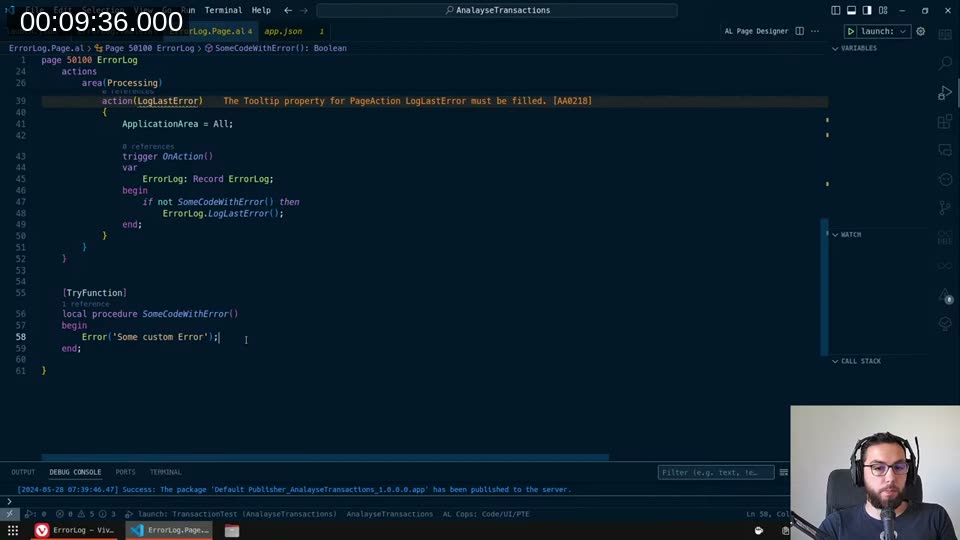
That works for simple errors. The problem is the moment that code path touches a Validate trigger on a real table — like Sales Header — the whole thing falls apart.
📖 Docs: The
[TryFunction]attribute creates a method that catches runtime errors and exceptions. But there’s a constraint: if the function attributed with[TryFunction]performs a database write (insert, modify, delete, lock table), it results in a runtime error at that point. See Handling errors using try methods .
Why Validate breaks everything
I put a real-world test together: find the first sales quote, validate Requested Delivery Date with Today(), then Modify(true). The idea was to see if a try function would catch any error from that validate trigger without persisting the change.
It doesn’t work. When you call Validate inside a try function scope, the OnValidate trigger on Sales Header eventually calls LockTable() — and that call is not permitted inside a try function context. The debugger made it obvious:
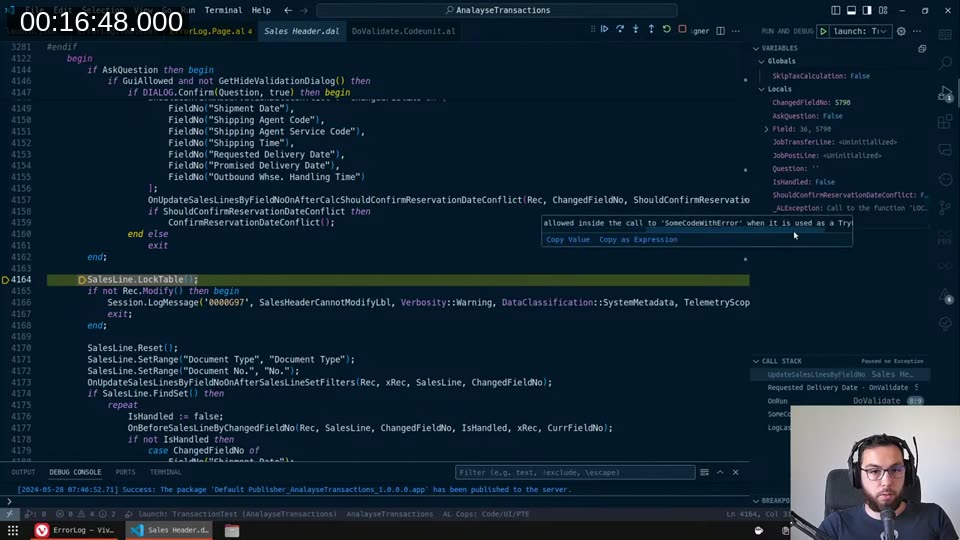
The error isn’t from my custom error — it’s from the base app’s validate trigger doing a LockTable. And the kicker is that you can’t know in advance whether any given validate trigger will do this. Any extension can subscribe to any event and add a modify or lock table call. You can’t be safe.
Exploring the alternatives
CommitBehavior::Ignore — I tried marking the procedure with [CommitBehavior(CommitBehavior::Ignore)]. The tooltip says it should suppress any commit calls within the entire scope of that method and everything it calls.
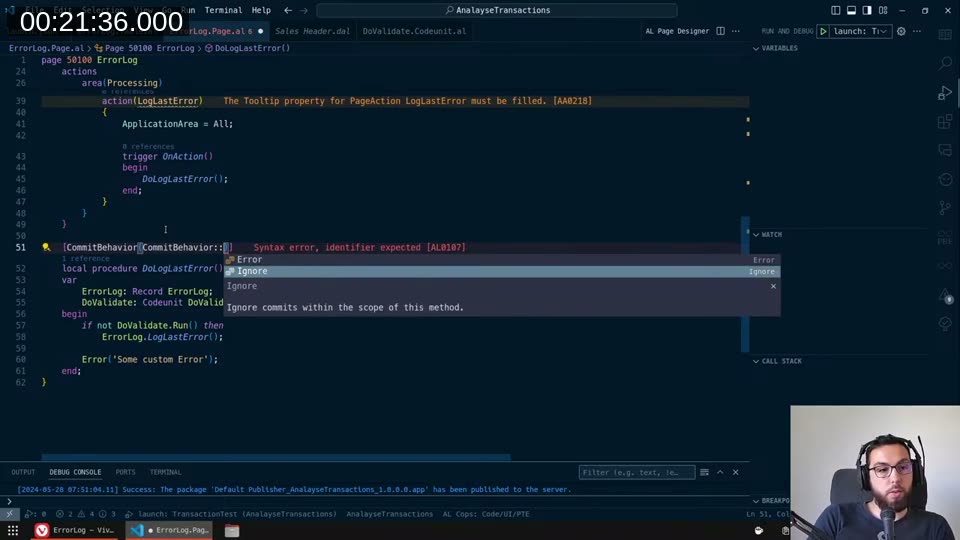
The sales quote still got saved. The CommitBehavior attribute can’t override an implicit commit that happens inside a try function or Codeunit.Run() context. It only affects explicit Commit() calls.
📖 Docs:
CommitBehaviorhas two options:IgnoreandError. The behavior only lasts for the method scope — once the method exits (successfully or via error), it reverts to standard behavior. See CommitBehavior attribute .
ErrorBehavior::Collect — The other idea was to use collectable errors. Mark the procedure with [ErrorBehavior(ErrorBehavior::Collect)] and iterate over the collected errors at the end. The problem: ErrorBehavior::Collect only works with errors that have been explicitly marked as collectable via an ErrorInfo object with Collectible = true. Virtually none of the base app’s errors are marked that way — Microsoft didn’t go back and retrofit the existing error messages.
📖 Docs: See Collecting Errors and the ErrorBehavior attribute .
The idea that actually worked
At around the 31-minute mark I had what I can only describe as a desperate idea: test runners.
The test framework is the one engine in AL that I know can roll back database changes reliably — even changes that were committed during the run. A test runner with TestIsolation = Procedure will revert everything that happened inside each test procedure, regardless of how deep the commits went. That’s exactly the guarantee I need.
The question was: can I run a test codeunit from within regular production code?
First I needed the test codeunit itself. I created a codeunit with Subtype = Test and a [Test] procedure that called the validate logic:
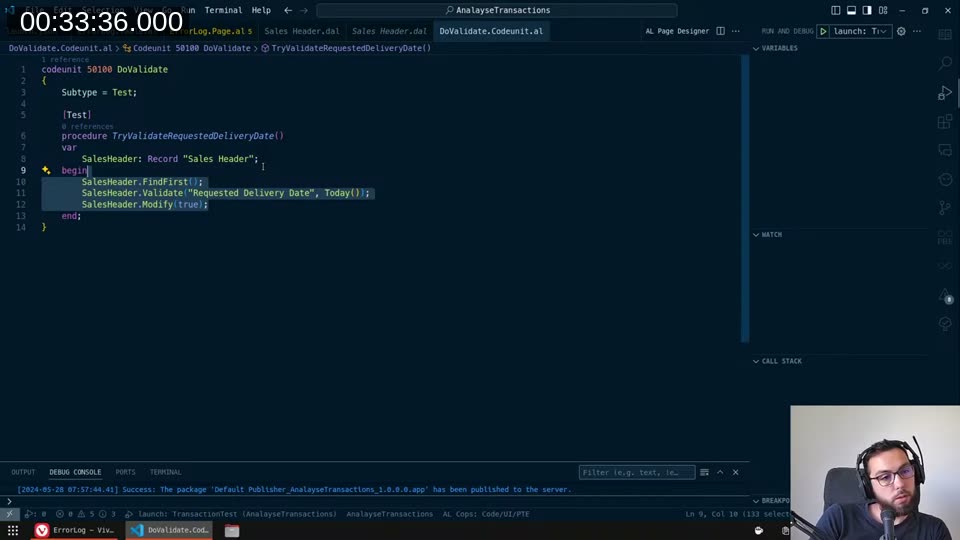
Then I dug into how the platform actually runs these. I spent a while reading through the AL Test Runner - Mgt codeunit from the test framework extension:
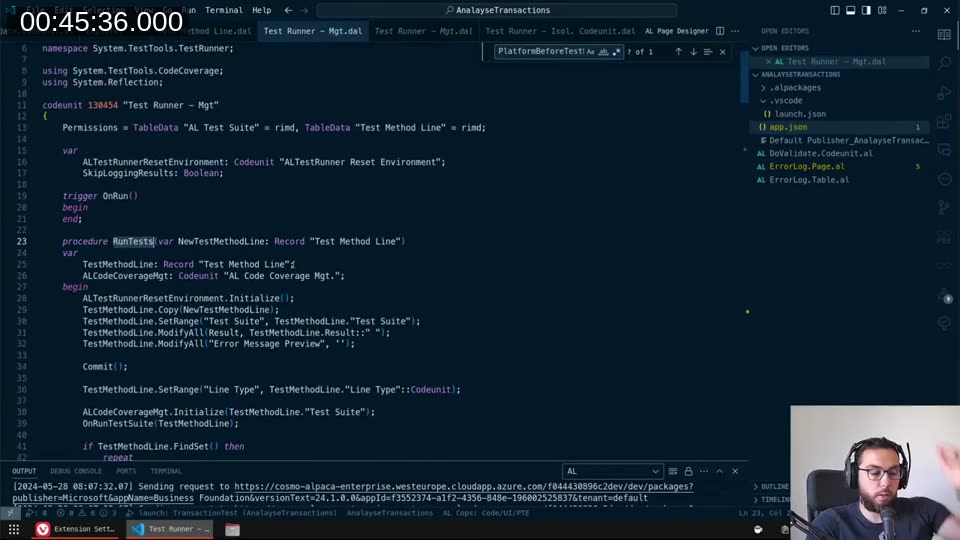
The core loop is straightforward: it builds a Test Method Line record, calls the test runner codeunit’s Run, and the OnAfterTestRun trigger reports success or failure. The isolation is handled by the runner’s TestIsolation property, not by the test code itself.
Building the custom test runner
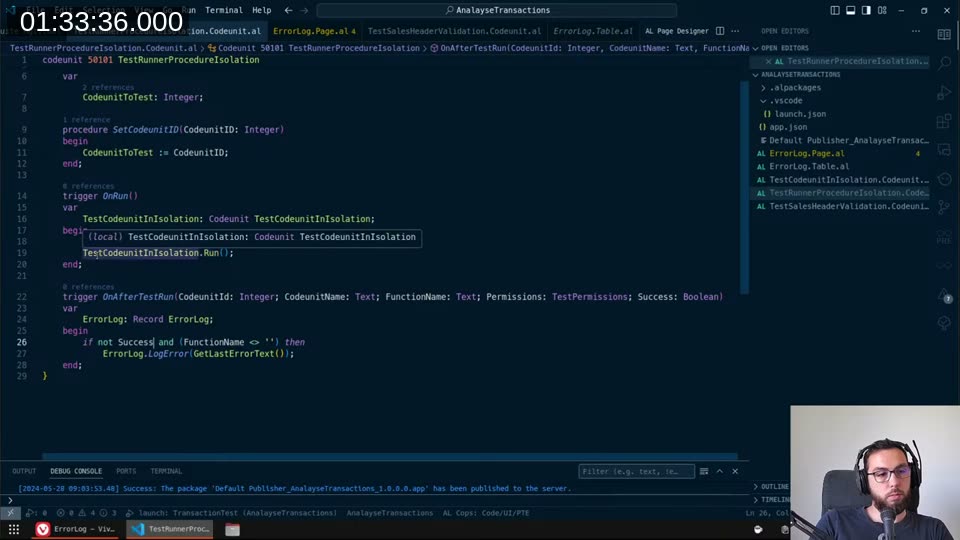
I created TestRunnerProcedureIsolation — a codeunit with Subtype = TestRunner and TestIsolation = Procedure. The OnRun trigger just calls Run() on whatever test codeunit was assigned. The OnAfterTestRun trigger is where the useful work happens: if Success is false and FunctionName isn’t empty (meaning an actual test function ran, not just the codeunit trigger), log the error.
📖 Docs: The
OnAfterTestRuntrigger receivesSuccess: BooleanandFunctionName: Text, letting you capture per-test results. See OnAfterTestRun trigger and TestIsolation property .
One discovery along the way: when you implement OnBeforeTestRun, something in the test framework suppresses the confirmation dialog that would otherwise pop up when the runner runs. The exact mechanism wasn’t obvious from the source code, but implementing the trigger (even as a no-op) was what made the approach silent. Without it, every invocation showed a Yes/No confirm dialog.
Injecting code via an interface
The remaining problem: I needed to run different pieces of validation code through the same runner without creating a separate test codeunit for each case. The solution was a ConditionalRunner interface with a ConditionalRun() method. The test codeunit holds an interface variable and calls ConditionalRunner.ConditionalRun() in its test procedure:
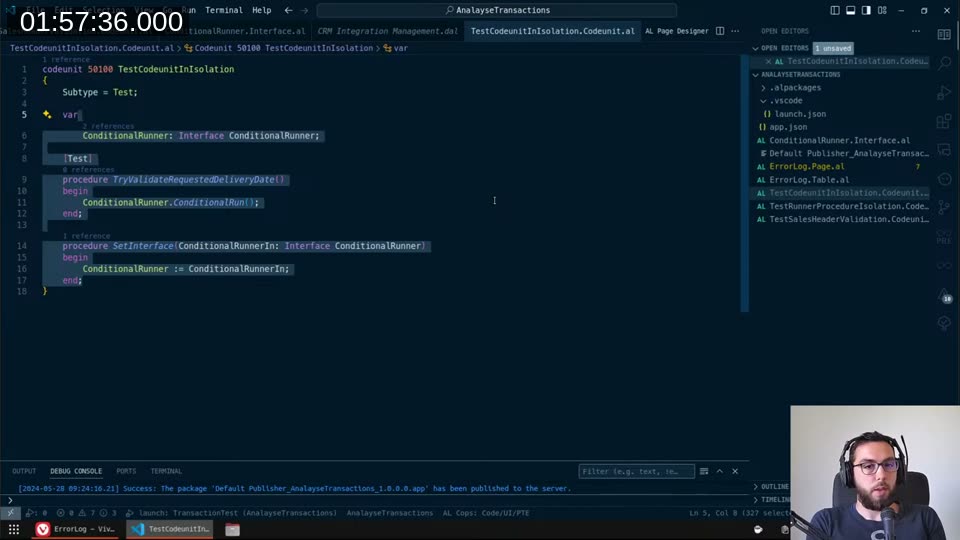
Each concrete implementation of the interface holds the actual validation logic. You set the interface on the test codeunit before calling the runner, and the runner invokes whatever the current implementation does.
The calling code then looks like this:
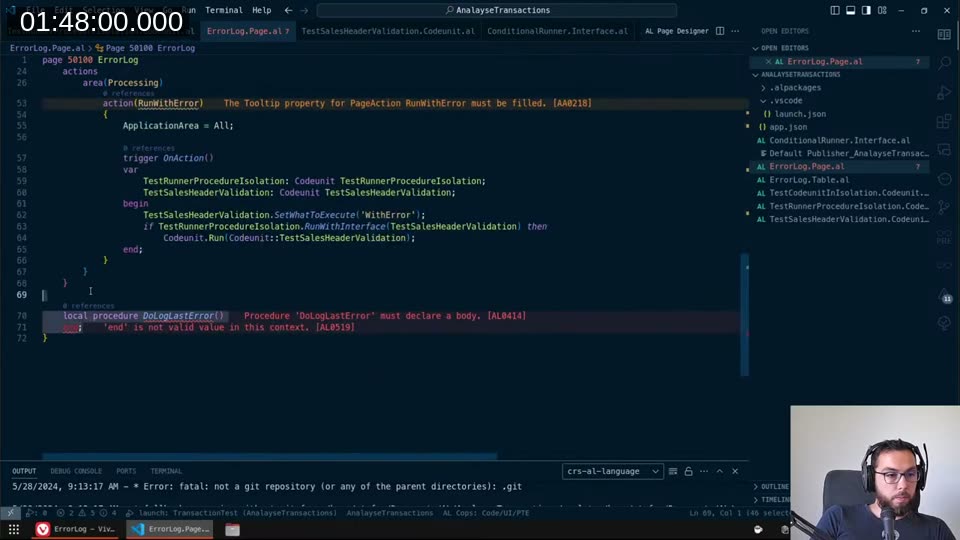
The pattern is:
- Set the interface implementation on the test codeunit
- Run via
TestRunnerProcedureIsolation.RunWithInterface(...)— this runs in isolation and rolls everything back - Check
GetTestWasSuccessful()— if true, run the same codeunit again normally so the changes actually commit - If false, the error was already logged to
ErrorLogbyOnAfterTestRun
Trade-offs
This is not a clean solution. I want to be honest about the costs:
- Double execution: if the validation passes, everything runs twice. That’s twice the database load, twice the time.
- Test framework dependency: the test runner extension needs to be installed. It’s available in sandbox environments but I needed to verify whether it’s accessible in production (left that for an off-stream investigation).
- Modal dialogs: if any code inside the validation triggers opens a page, shows a confirm, or does anything UI-related that the test framework doesn’t expect, you’ll get a runtime error from the test framework itself rather than from your validation logic.
- It’s conceptually wrong: the test framework is not designed for this. Whether it’s a good idea to ship this in production is genuinely debatable.
That said — it’s the only mechanism I found that gives you a hard guarantee: whatever code runs inside that test procedure, with however many commits, nested code paths, and event subscribers involved, everything will be rolled back. The platform enforces that, not you.
I covered the follow-up in the Part 2 stream , where I looked at achieving the same thing without relying on the test framework at all.
This post was drafted by Claude Code from the stream transcript and video frames. The full stream is on YouTube if you want the unfiltered version. (I did read and check the output before posting, obviously 😄)