Introducing ALCops — LinterCop's Next Chapter
Arthur van de Vondervoort joined me on stream this week to announce ALCops — a project he’s been quietly building for the last three or four months as a complete replacement for BusinessCentral.LinterCop . You can watch the full stream on YouTube if you want the unfiltered version.
I started LinterCop a few years back, Arthur took it somewhere far beyond what I had imagined — almost 100 rules, a huge contributor base — and now he’s building the next thing on top of that foundation. Worth watching.
Why Start Over
The honest answer is that LinterCop had accumulated enough structural issues that patching them individually wasn’t going to work anymore. A few specific ones:
GitHub rate limits. When GitHub tightened their rate limits for unauthenticated requests in May 2025, pipelines that were downloading the LinterCop DLL directly from a release started failing. Sixty requests per hour per public IP sounds like a lot until you’re running parallel pipelines. This pushed the issue of “we should use NuGet” from “nice to have” to “actually necessary.”
The Swiss army knife problem. LinterCop grew into a mix of AL language rules, Business Central implementation rules, formatting rules, test rules — all in one place. If you introduced a new formatting rule, every team that had said “I don’t care about formatting” now had to update their ruleset to suppress it. Microsoft’s own approach — separate CodeCop, UICop, PerTenantExtensionCop, AppSourceCop — is domain-specific for a reason.
Rule severity was frozen. There was an informal agreement that new LinterCop rules would always ship as Info because promoting something to Warning might break somebody’s pipeline. That was too conservative and it made the tool less useful.
Six Domain-Specific Analyzers
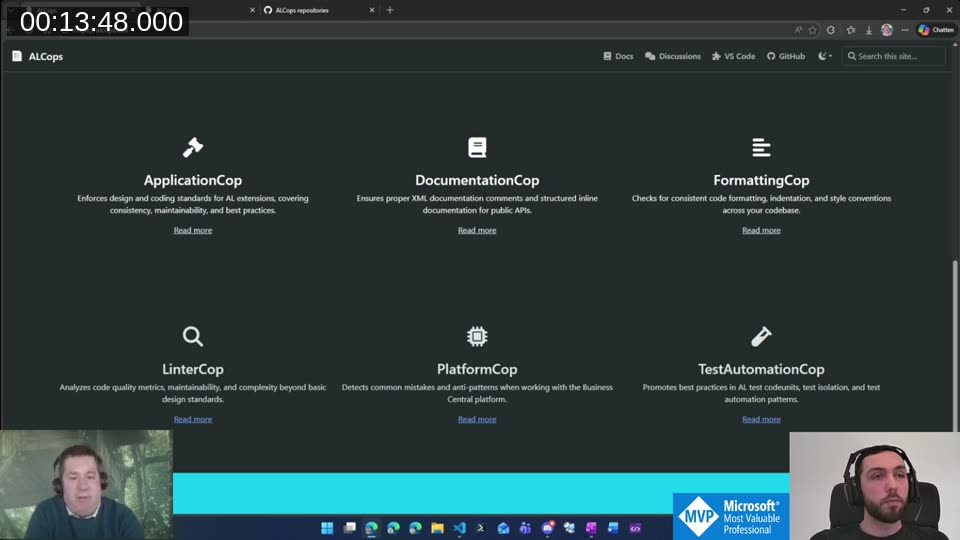
ALCops splits the responsibility across six analyzers:
- ApplicationCop — Business Central specific coding standards: confirm management codeunit, translation helper, DataPerCompany, permission coverage, that kind of thing
- DocumentationCop — XML comments, inline API documentation, commit transaction justifications
- FormattingCop — indentation, style conventions, consistent formatting across the codebase
- LinterCop — code quality focused on AL itself: cyclomatic complexity, cognitive complexity, naming patterns
- PlatformCop — AL language rules that are independent of the BC implementation: method call parentheses, FlowFilter filtering methods,
.Get()parameter validation - TestAutomationCop — best practices for AL test codeunits; early stage, Luc van Vugt contributed the initial idea here
The key insight is that you opt into the domains you care about. If formatting isn’t something you want to enforce, you just don’t enable FormattingCop. No more suppressing rules category by category in a ruleset.
Code Quality Improvements Under the Hood
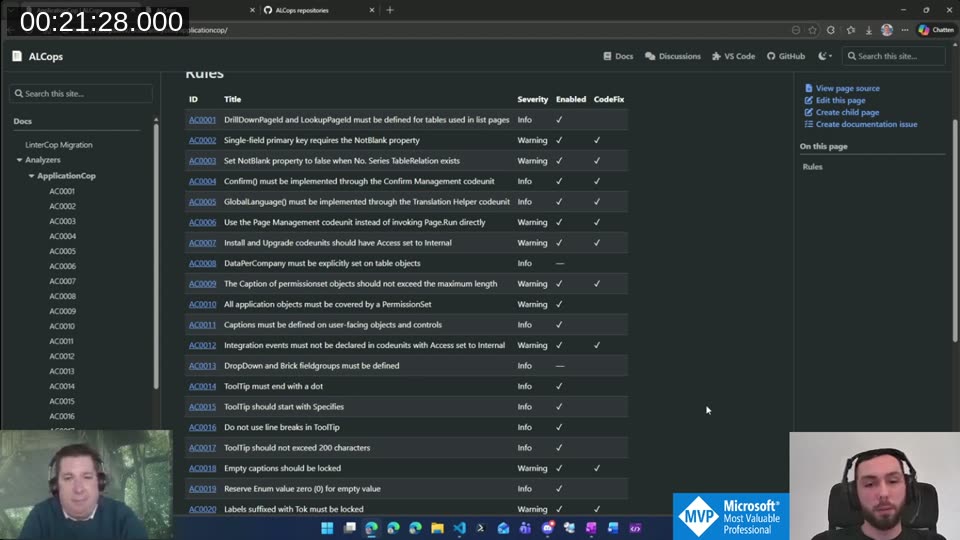
Arthur did a rule-by-rule review during the migration rather than just copying everything over. A few things changed:
Severity. With separate cops, it’s now reasonable to set meaningful default severities. If you’ve opted into ApplicationCop, you probably want the rules to actually surface as warnings, not noise.
Code fixes. LinterCop shipped with five or six code fixes. ALCops now has 30. That means 30 rules where you can hit “apply fix” and it’s done — no manual edit, no sending it through an LLM. Where a fix wasn’t possible because the transformation is ambiguous, Arthur improved the rule descriptions so that coding agents understand what needs to change.
Correctness fixes. Some rules had subtle bugs — for example, rules checking whether a label had a Locked property would pass even if it was set to false. ALCops actually validates the value. If you migrate and see warnings on code you thought was clean, that is often why.
AI-friendly descriptions. He mentioned using agentic tools extensively during the migration and that it shaped how the rule descriptions were written — more specific about what the diagnostic means and what the correct fix looks like.
NuGet Distribution
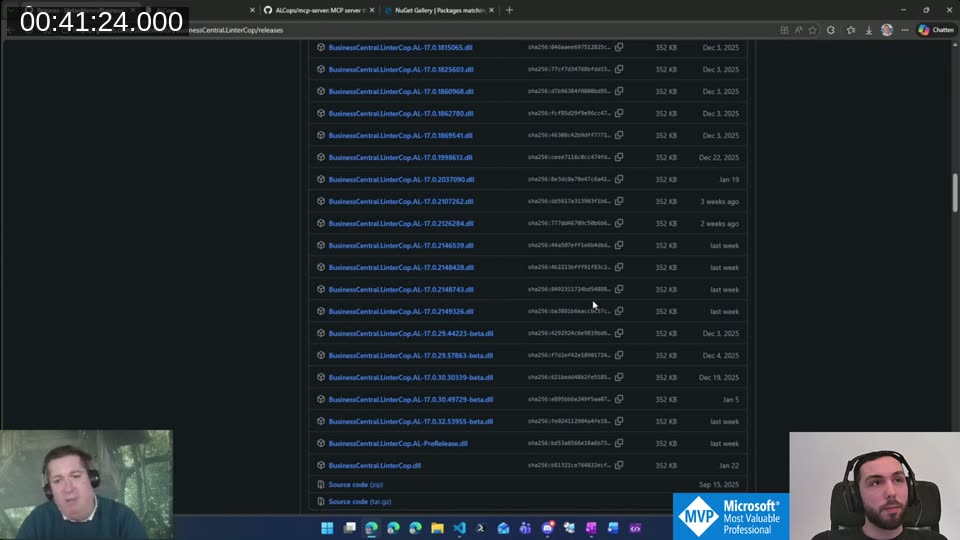
The old release format: one GitHub release with 48 assets (one DLL per AL language version). You can see why that was awkward to maintain and even more awkward to pin to a specific version in your pipeline.
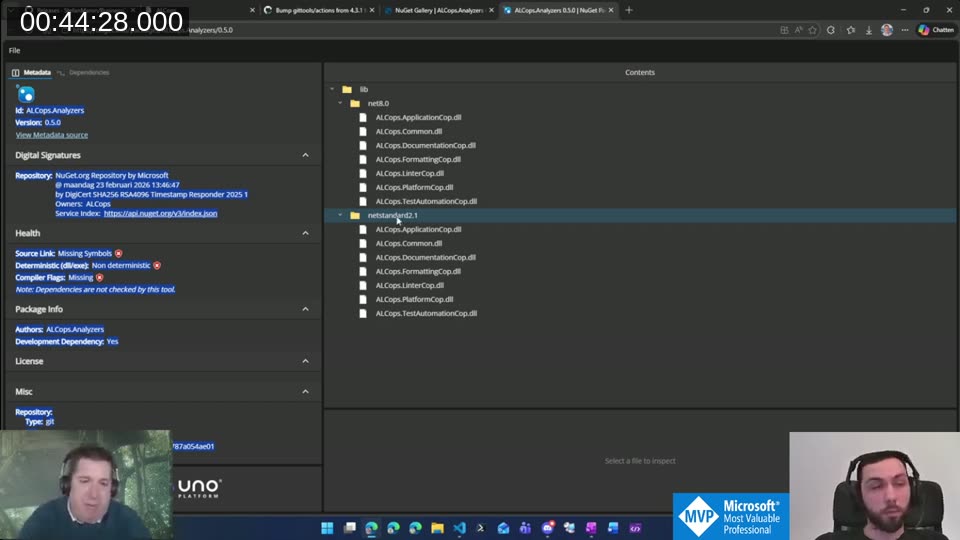
ALCops publishes to NuGet. The package contains two folders: lib/net8.0 and lib/netstandard2.1. That’s it — six DLLs each, one per analyzer, covering all currently supported AL language versions. Arthur’s trick here: AL versions 16 through 17 all target .NET 8.0, so using reflection he built a single DLL that works across all of them. When Microsoft eventually moves to .NET 10, the structure already supports adding a new target.
For pipelines, you pick net8.0 (AL 16+) or netstandard2.1 (older). Arthur has an AL-Go helper that handles this automatically, and Azure DevOps support is still in progress.
VS Code Extension
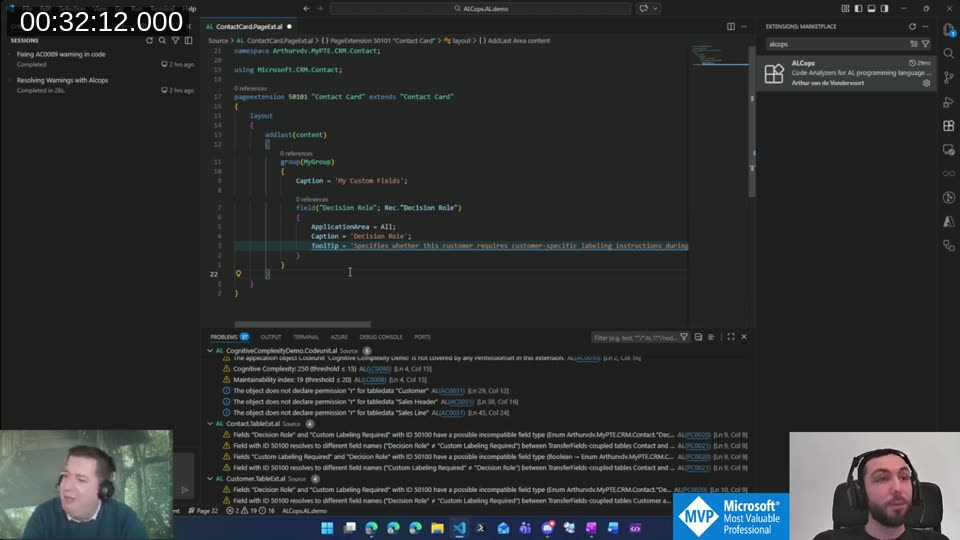
The VS Code extension is available in the marketplace — search for “ALCops” or install directly from the VS Code Marketplace . You can enable exactly the cops you want from the extension settings. One note: LinterCop and ALCops reuse the same diagnostic IDs, so running both at the same time will cause conflicts. Disable LinterCop first when testing ALCops.
The Problems panel in the screenshot shows exactly what you’d expect — diagnostics across files, each linked to the cop that generated it, with clickable rule IDs that go to the docs.
MCP Server for AI Tooling
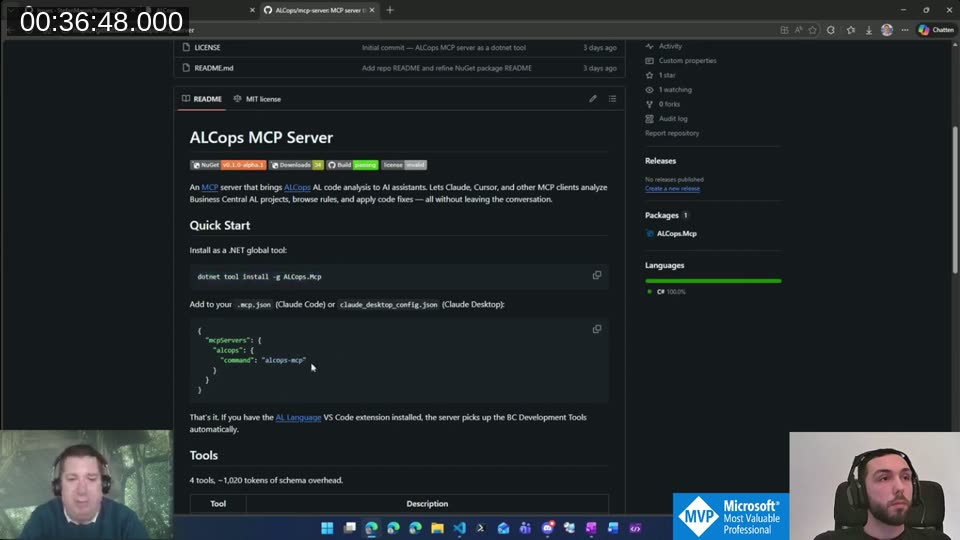
This is the part I find most interesting. ALCops ships an MCP server that exposes the analyzers to Claude Code, Cursor, or any other MCP-compatible client.
dotnet tool install -g ALCops.Mcp
Then add it to .mcp.json:
{
  "mcpServers": {
    "alcops": {
      "command": "alcops-mcp"
    }
  }
}
The server picks up whatever cops you have configured in the VS Code extension and exposes them to the agent — including the Microsoft-provided cops. The important detail Arthur mentioned: code fixes are applied directly by the fix routine, not handed off to the LLM as file edits. So the agent calls the code fix, the DLL applies it in-place, and the result is deterministic rather than being an LLM interpretation of what “fix this” means.
It’s early — v0.1 alpha — but the idea is solid. A GitHub discussion on the LinterCop repo from a few weeks ago asked exactly this question (“can Claude understand LinterCop rules?”), and now there’s an answer.
📖 Docs: ALCops MCP server setup is documented at github.com/ALCops/mcp-server . It exposes 4 tools: analyze a project or file, list available rules, retrieve code fixes, and apply fixes. If you have the AL Language extension installed, it picks up the BC Development Tools automatically — no extra config needed.
The TransferFields Rule
One rule worth calling out specifically: the TransferFields coupling check. In LinterCop it had about 200 hardcoded table pairs. Arthur built a pipeline (the TransferFieldsCollector
repo) that spins up Business Central artifacts for every version and every localization, runs a custom analyzer to extract all TransferFields method invocations, and generates a static lookup of coupled table pairs.
The result: ~400 bidirectional couplings and ~500 unidirectional ones. The rule was also split into two: one for field name mismatches (warning) and one for type mismatches (error, because that will throw a runtime exception).
If you migrate from LinterCop and see new warnings on code you thought was clean, this is likely the reason. The rule is now both more complete and more correct.
The GitHub Organization
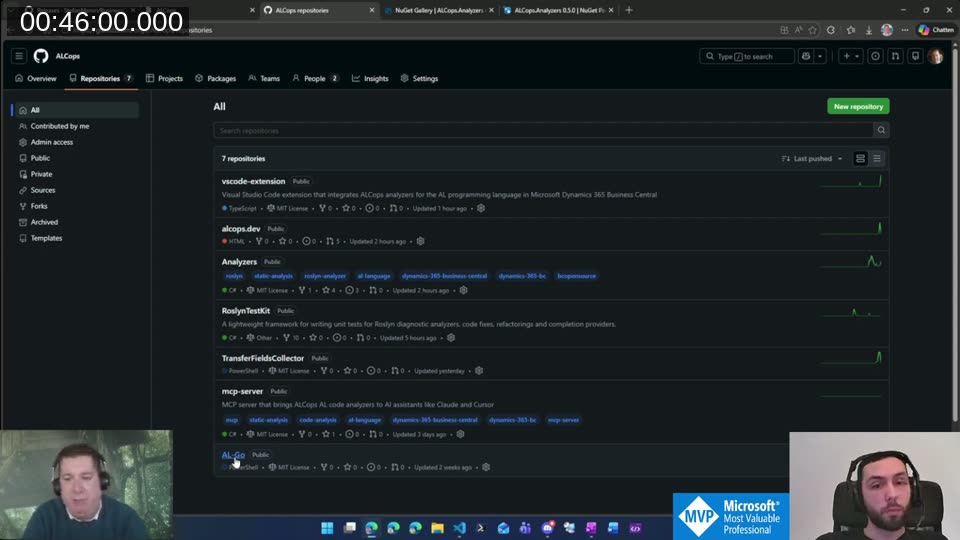
ALCops has its own GitHub org at github.com/ALCops with seven repositories: the analyzers themselves, the VS Code extension, the documentation site, the MCP server, RoslynTestKit, TransferFieldsCollector, and an AL-Go repo. Contributing works the same way as LinterCop did — fork, PR to main.
What Happens to LinterCop
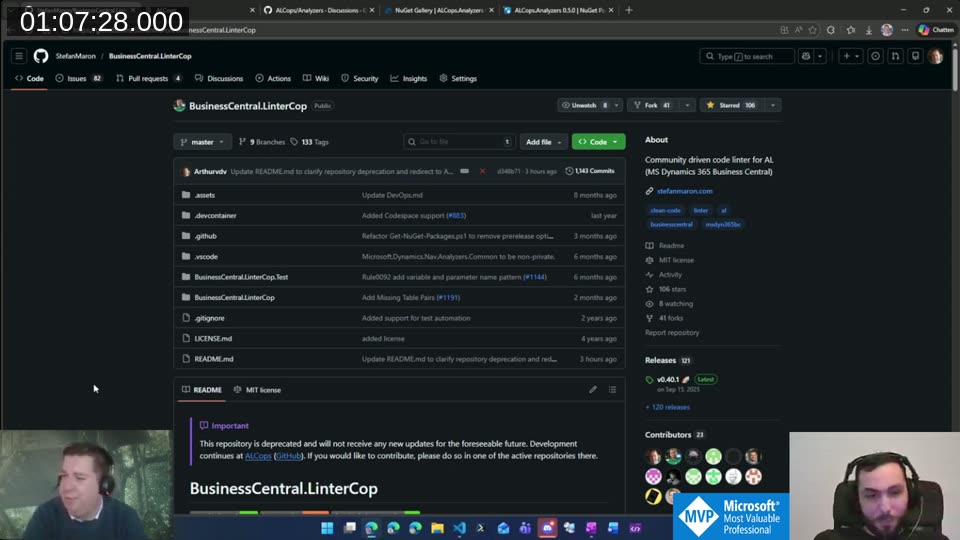
LinterCop is deprecated. The README now says so explicitly. Arthur’s plan: keep it working as long as practical — probably through the end of 2026 — but no new rules, no implementation changes. If a bug emerges that’s too difficult to fix given the structural constraints, it may just stay unfixed. Pipelines that were already downloading the DLL per AL version should keep working, but the gap is already visible: the current AL extension is at 16.4, and the VS Code marketplace is still on 16.3.
The migration path: install the ALCops VS Code extension, disable LinterCop, review your ruleset against the LinterCop migration guide , and start there. Arthur’s advice was to test locally first rather than flipping the switch in pipelines — there will be new warnings on code that was previously clean, and that’s worth reviewing rather than bulk-suppressing.
📖 Docs: The LinterCop migration guide on alcops.dev has the full mapping table for all 93 LC rules to their new diagnostic IDs (PC, AC, DC, FC, LC, TC prefixes) plus instructions for updating
.ruleset.jsonfiles and pragma directives.
ALCops is early — the analyzers are at v0.5, the MCP server is v0.1 alpha — but the foundation is genuinely better than what LinterCop was working with. Proper versioning, domain separation, NuGet distribution, AI-friendly descriptions, fixes that don’t go through an LLM. Arthur built most of this solo over four months, and the community is where it goes from here. If you have ideas or want to contribute, the Discussions tab on the Analyzers repo is the right place to start.
This post was drafted by Claude Code from the stream transcript and video frames. The full stream is on YouTube if you want the unfiltered version. (I did read and check the output before posting, obviously 😄)