MSDyn365BC.Ntfy Development Session — Redesigning the BC Push Notification App
Push notifications from Business Central to your phone — that’s the idea behind MSDyn365BC.Ntfy . In this stream session I worked on rethinking the data model for the app, which started as a proof of concept and needed some structural improvements before it was worth building on further.
The full stream is on YouTube if you want to watch it live. Below I’m covering the key decisions and code changes from that session.
What ntfy is
ntfy (pronounced “notify”) is an open-source pub/sub notification service. You publish a message to a topic with a simple HTTP POST — that’s it. No sign-up required. The topic name is essentially the password, so generate something random if you care about privacy.
curl -d "Backup successful 😀" ntfy.sh/mytopic
If the ntfy Android or iOS app is subscribed to mytopic, you get an instant push notification. There’s also a web app, a CLI, and you can self-host the server entirely.
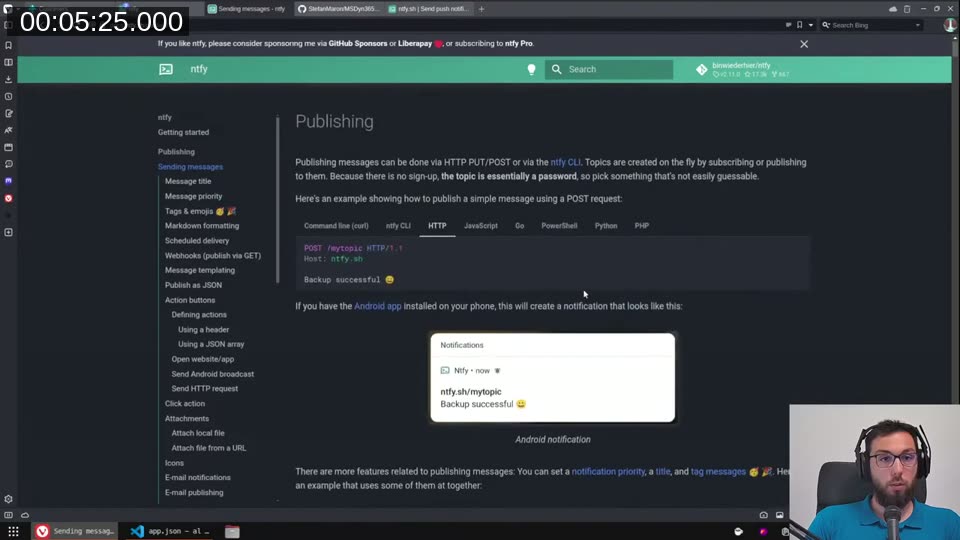
📖 Docs: The ntfy publishing documentation covers HTTP PUT/POST, the ntfy CLI, actions, scheduled delivery, and a lot more. Self-hosting is straightforward — see ntfy self-hosting .
The original idea for this BC integration was simple: notify me on my phone when a long-running report finishes processing. If a report runs for 10 minutes you don’t want to sit at the computer waiting. Subscribe to a topic on your phone, configure BC, and let it ping you when it’s done.
The original design — and what was wrong with it
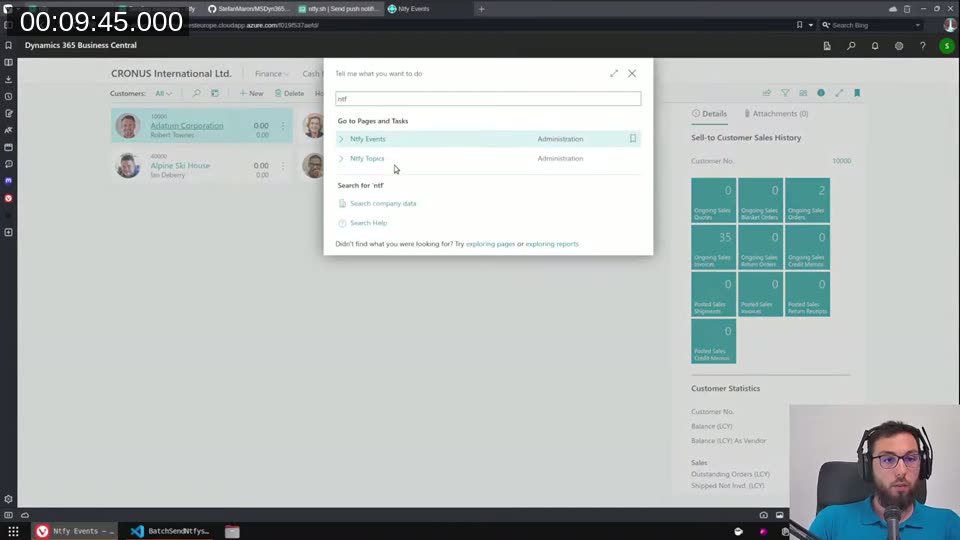
The v1 proof of concept had two visible pages: Ntfy Topics and Ntfy Events. A user would add a topic (a URL-safe string for the ntfy topic), then add event subscriptions to the events table — linking a topic to an event type like “Sales Document Released”.
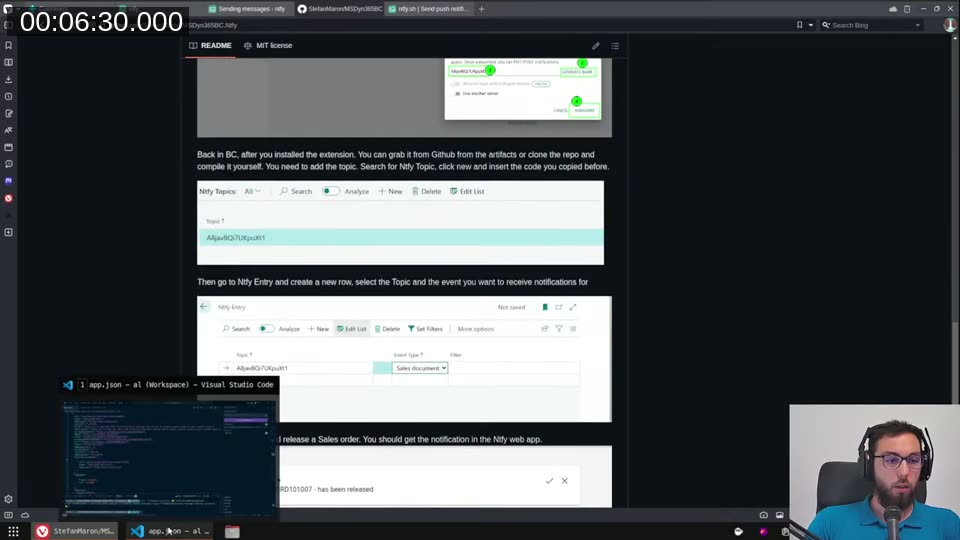
The problem: the events table used (UserName, NtfyTopic, EventType) as the primary key. That meant you could only subscribe to each event type once per topic. If you wanted to receive Sales Document Released notifications separately for Orders and Quotes — with different filters — you were blocked by the key constraint.
A second structural issue: there was no Enabled flag on the topic level. There was no easy way to pause all notifications for a topic without deleting everything.
Redesigning the data model
The first change was promoting Enabled to the NtfyTopic table:
field(3; Enabled; Boolean)
{
    Caption = 'Enabled';
    InitValue = true;
}
InitValue = true matters — without it, every new topic row would default to disabled and notifications would silently not fire.
For the events table, I removed EventType from the primary key and replaced it with a line number:
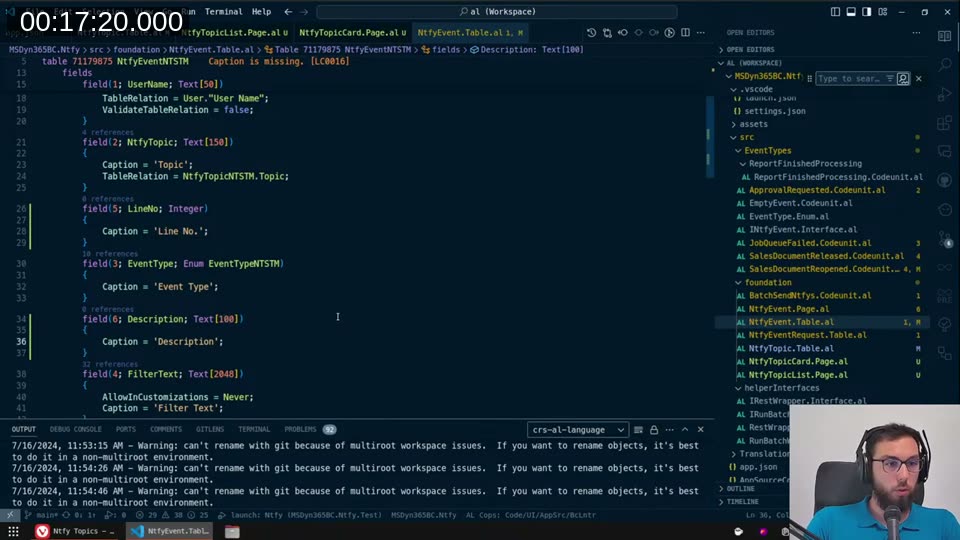
field(5; LineNo; Integer)
{
    Caption = 'Line No.';
}
field(6; Description; Text[100])
{
    Caption = 'Description';
}
The new primary key is (UserName, NtfyTopic, LineNo). Now you can subscribe to the same event type multiple times with different filter configurations — one subscription for Quote-type documents, another for Orders.
Header/lines page structure
With the data model in place, I restructured the UI to a proper header/lines layout. The NtfyTopic card page now acts as the header and embeds the events as a part:
page 71179878 NtfyTopicCardNTSTM
{
    PageType = Card;
    SourceTable = NtfyTopicNTSTM;
    ...
    layout
    {
        area(Content)
        {
            group(General)
            {
                field(NtfyTopic; Rec.Topic) { }
                field(UserName; Rec.UserName) { }
                field(Enabled; Rec.Enabled) { }
            }
            part(NtfyEventsNTSTM; NtfyEventsNTSTM)
            {
                Caption = 'Events';
                SubPageLink = UserName = field(UserName),
                              NtfyTopic = field(Topic);
            }
        }
    }
}
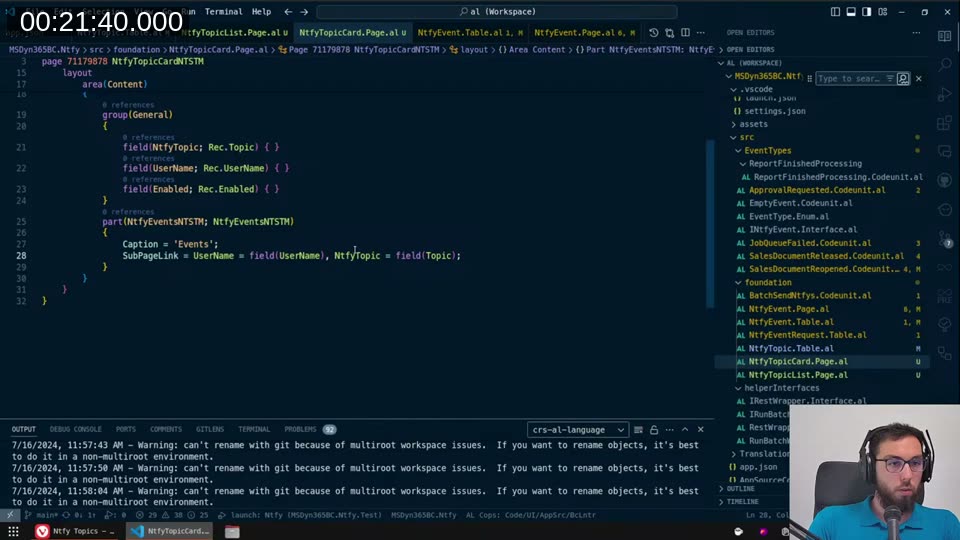
The SubPageLink connects the events subpage to the current topic. Both UserId and Topic are read-only on the form — the user shouldn’t be changing either once set, and the user name is populated automatically via OnOpenPage filter logic.
Extracting the filter helper
Every event type implementation had its own copy of the same filter page builder boilerplate — open a filter dialog, read the view back, persist it to the FilterText field. I extracted this into a reusable public codeunit:
codeunit 71179886 NtfyHelperNTSTM
{
    Access = Public;

    procedure GetFilterTextForTable(var FilterPageBuilder: FilterPageBuilder;
        Caption: Text; TableId: Integer; var FilterText: Text[2048])
    var
        RecRef: RecordRef;
    begin
        RecRef.Open(TableId);
        FilterPageBuilder.AddTable(Caption, RecRef.Number);
        if FilterText <> '' then
            FilterPageBuilder.SetView(Caption, FilterText);
        if FilterPageBuilder.RunModal() then begin
            if not FilterPageBuilder.GetView(Caption).Contains('WHERE') then
                FilterText := ''
            else
                FilterText := CopyStr(FilterPageBuilder.GetView(Caption), 1, MaxStrLen(FilterText));
        end;
        NtfyEvent.Modify(true);
    end;

    procedure GetSimpleFilterTextForTable(TableId: Integer; var FilterText: Text[2048])
    var
        FilterPageBuilder: FilterPageBuilder;
        RecRef: RecordRef;
    begin
        GetFilterTextForTable(FilterPageBuilder, TableId, FilterText);
    end;
}
The overload with just TableId handles the common case where you only need the table caption and don’t need to pre-configure the builder. The version that takes a FilterPageBuilder reference lets you add custom fields or set it up before the modal runs — useful for the Report Finished Processing event, which needs to filter by Object Type = Report before showing the dialog.
How the notification dispatch works
The core flow lives in NtfyEvent.Table.al. When a BC event fires — say, Sales Document Released — it calls SendNotifications, passing the event type and a parameters dictionary:
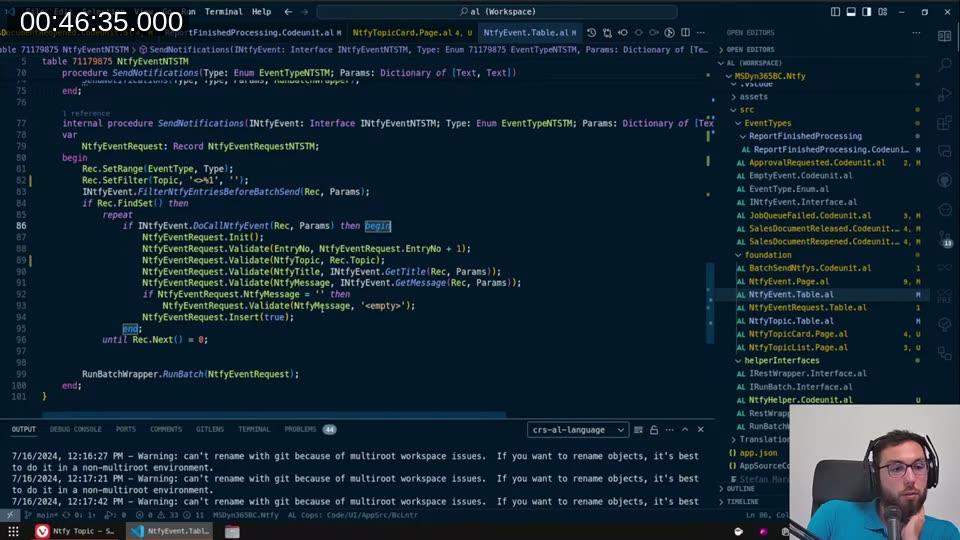
internal procedure SendNotifications(INtfyEvent: Interface INtfyEventNTSTM;
    Type: Enum EventTypeNTSTM; Params: Dictionary of [Text, Text])
var
    NtfyEventRequest: Record NtfyEventRequestNTSTM;
begin
    Rec.SetRange(EventType, Type);
    Rec.SetFilter(Topic, '<>%1', '');
    INtfyEvent.FilterNtfyEntriesBeforeBatchSend(Rec, Params);
    if Rec.FindSet() then
        repeat
            if INtfyEvent.DoCallNtfyEvent(Rec, Params) then begin
                NtfyEventRequest.Init();
                NtfyEventRequest.Validate(EntryNo, NtfyEventRequest.EntryNo + 1);
                NtfyEventRequest.Validate(NtfyTopic, Rec.Topic);
                NtfyEventRequest.Validate(NtfyTitle, INtfyEvent.GetTitle(Rec, Params));
                NtfyEventRequest.Validate(NtfyMessage, INtfyEvent.GetMessage(Rec, Params));
                if NtfyEventRequest.NtfyMessage = '' then
                    NtfyEventRequest.Validate(NtfyMessage, '<empty>');
                NtfyEventRequest.Insert(true);
            end;
        until Rec.Next() = 0;

    RunBatchWrapper.RunBatch(NtfyEventRequest);
end;
The two-stage approach is intentional. First, FilterNtfyEntriesBeforeBatchSend lets the implementation pre-filter the event table rows using fields added via table extension — filtering before iterating avoids touching rows that will never match. Second, DoCallNtfyEvent checks per-row whether the saved FilterText actually matches the record that triggered the event. You can’t do that pre-filtering because the filter is stored as a serialised view string, not as a SQL predicate on the event table itself.
The matched events are written to a temporary NtfyEventRequest table, which is then handed to RunBatchWrapper. That tries to start a background session via StartSession — if that fails (permissions, limits), it runs synchronously. Either way the messages are sent one-by-one with a REST POST to https://ntfy.sh/{Topic}.
The end result in BC
After rebuilding and deploying, the Ntfy Topic card in Business Central looks like this:
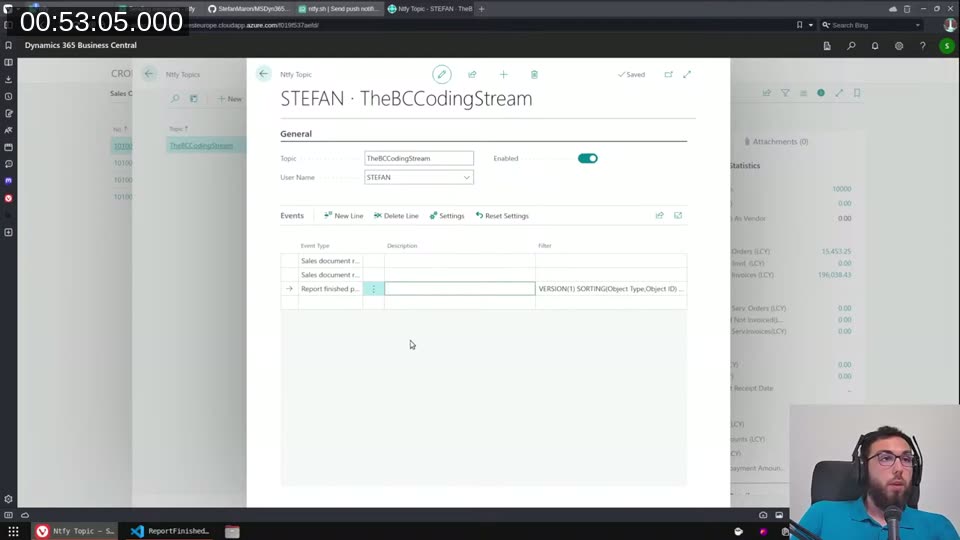
One topic (TheBCCodingStream), enabled, with two event subscriptions in the lines — Sales Document Released (twice, with different document type filters) and Report Finished Processing (with a report object ID filter). Each event line can have a description for your own reference.
The original proof of concept also showed this working: release a Sales Order, get a push notification within a second or two, including a web service link that opens directly to that order.
What’s still open
The SetUserFilter procedure has a TODO in it — administrators should be able to see all users’ subscriptions, not just their own. Right now it always filters to UserId regardless of permissions. That’s a known gap I flagged but didn’t fix in this session.
The interface for implementing new event types also still feels heavier than it should be. Every new event needs an event subscriber, a codeunit implementing INtfyEventNTSTM, and registration in the enum. There’s no compiler-enforced way to remind a developer that all three pieces need to exist. I don’t have a clean answer for that yet — if you have ideas, drop them in the repo.
The code is on GitHub at StefanMaron/MSDyn365BC.Ntfy . Pull requests and new event type ideas are welcome.
This post was drafted by Claude Code from the stream transcript and video frames. The full stream is on YouTube if you want the unfiltered version. (I did read and check the output before posting, obviously 😄)