Creating a NuGet Installer Extension for Business Central
AL-Go has been gaining NuGet support for a while — you can now publish BC apps to a NuGet feed as part of your pipeline. In this stream I took that one step further and asked: can we pull apps back from a NuGet feed and install them directly into a BC environment, from inside BC itself?
The short answer: yes, it works. Here’s how I built the proof of concept.
The NuGet v3 API
The AppSource symbols feed lives at a URL like:
https://dynamicssmb2.pkgs.visualstudio.com/DynamicsBCPublicFeeds/_packaging/AppSourceSymbols/nuget/v3/index.json
That index is a JSON document with a resources array. Each entry has a @type and a @id. The two endpoints I care about are SearchQueryService (search for packages by name) and RegistrationsBaseUrl (get details and versions for a specific package, including the download URL).
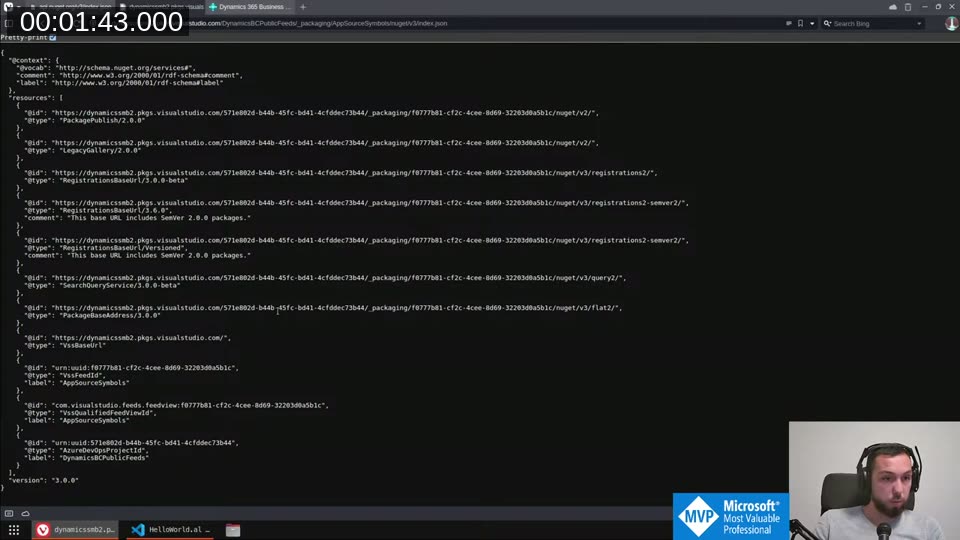
The same structure applies to api.nuget.org and to any private Azure Artifacts NuGet feed — they all implement the same v3 protocol. That meant I could write one extension that works against any of them.
Setting Up the Feeds Table
The first object is a simple setup table — NugetFeeds — that stores the feed URL, a description, and an optional access token for private feeds. The token field uses ExtendedDataType = Masked so it doesn’t show in plain text; in a production version I’d move it to isolated storage, but this was enough to get started.
table 50100 NugetFeeds
{
    DataClassification = SystemMetadata;
    fields
    {
        field(1; EntryNo; Integer) { AutoIncrement = true; }
        field(2; FeedUrl; Text[250]) { }
        field(3; FeedName; Text[80]) { }
        field(4; Token; Text[100])
        {
            ExtendedDataType = Masked;
        }
    }
}
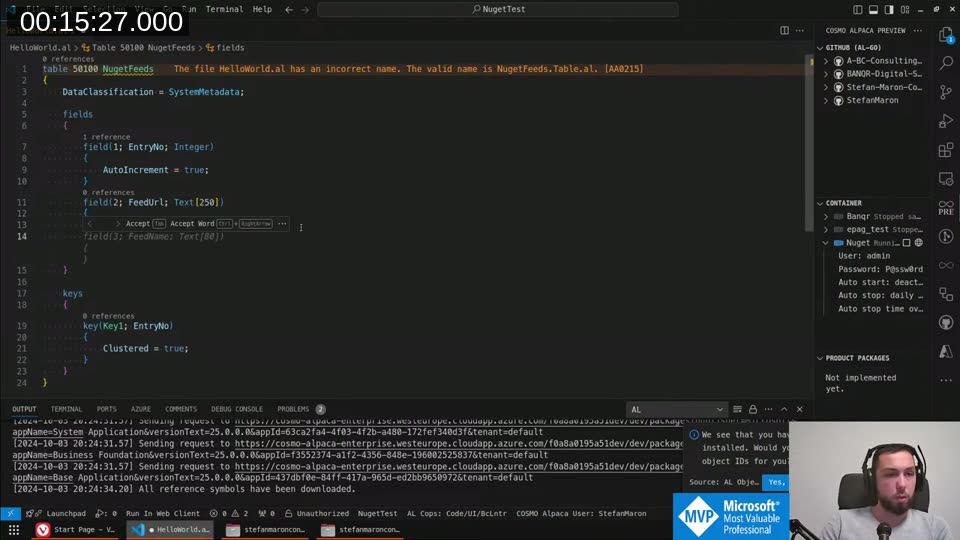
The list page for the table (NugetFeedsList) also doubles as the entry point — it has an action that triggers a search against the selected feed.
Finding the Search Query Service URL
The feed URL in the table is just the index — I need to dig out the actual SearchQueryService URL before I can search. That means fetching the index, parsing the resources array, and looking for an entry whose @type starts with SearchQueryService.
procedure GetSearchQueryServiceUrl(FeedUrl: Text): Text
var
    HttpResponseMessage: Codeunit "Http Response Message";
    RestClient: Codeunit "Rest Client";
    Resources: JsonArray;
    TempToken, TempToken2: JsonToken;
    SearchQueryServiceUrl: Text;
begin
    HttpResponseMessage := RestClient.Get(FeedUrl);
    HttpResponseMessage.GetContent().AsJson().AsObject().Get('resources', TempToken);
    Resources := TempToken.AsArray();

    foreach TempToken in Resources do begin
        TempToken.AsObject().Get('@type', TempToken2);
        if TempToken2.AsValue().AsText().StartsWith('SearchQueryService') then begin
            TempToken.AsObject().Get('@id', TempToken2);
            exit(TempToken2.AsValue().AsText());
        end;
    end;
end;
One thing I hit here: JsonToken.AsArray() requires runtime version 15 or later. My local container was still on 14, so I had to use the older GetArray approach with a temporary JsonToken variable instead. The new runtime will have this natively — very welcome.
Building the App List
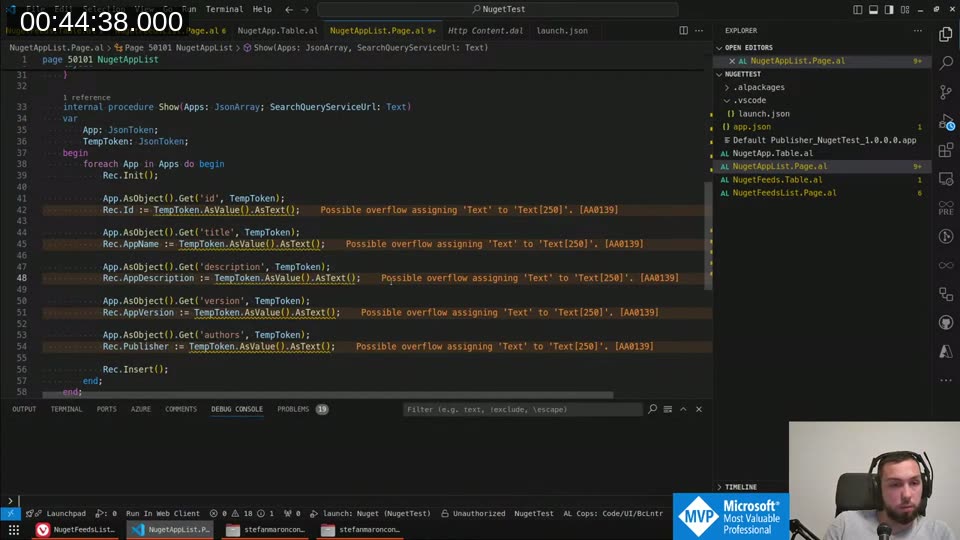
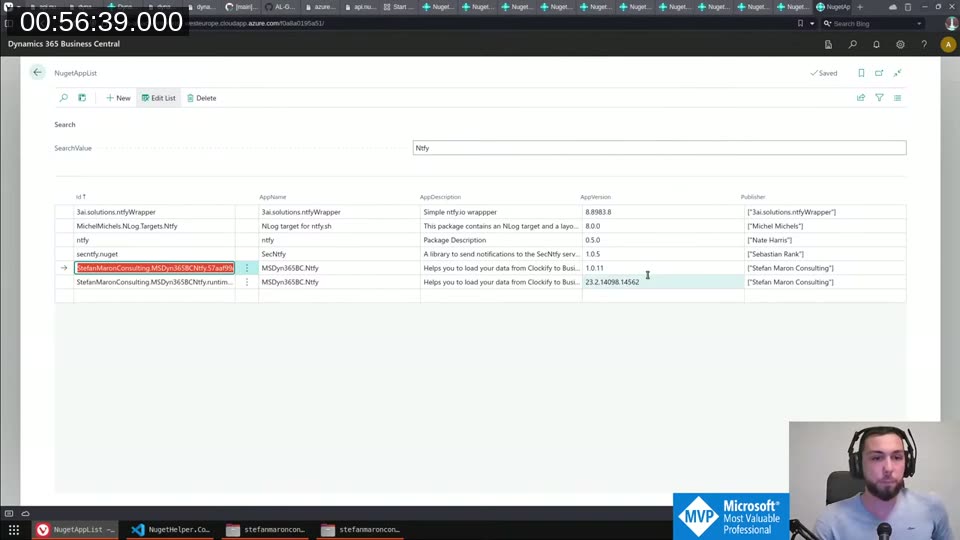
I added a temporary table NugetAppList and a matching list page. The Show procedure on the page takes a JsonArray of search results, iterates over it, and inserts a row for each package:
foreach App in Apps do begin
    Rec.Init();
    App.AsObject().Get('id', TempToken);
    Rec.Id := TempToken.AsValue().AsText();
    App.AsObject().Get('title', TempToken);
    Rec.AppName := TempToken.AsValue().AsText();
    App.AsObject().Get('description', TempToken);
    Rec.AppDescription := TempToken.AsValue().AsText();
    App.AsObject().Get('version', TempToken);
    Rec.AppVersion := TempToken.AsValue().AsText();
    App.AsObject().Get('authors', TempToken);
    Rec.Publisher := Format(TempToken.AsArray());
    Rec.Insert();
end;
authors is a JSON array, so I couldn’t do .AsValue().AsText() directly — I had to Format() the array, which is ugly but works for a prototype. In practice, BC apps almost always have a single author entry so it doesn’t matter much.
The NugetHelper Codeunit
I extracted the feed-querying logic into a NugetHelper codeunit to keep the page code clean. It exposes two main procedures: GetSearchQueryServiceUrl (shown above) and GetAppArray, which takes the feed URL and a search term and returns the data array from the search response.
procedure GetAppArray(var Apps: JsonArray; var SearchQueryServiceUrl: Text; FeedUrl: Text)
var
    HttpResponseMessage: Codeunit "Http Response Message";
    RestClient: Codeunit "Rest Client";
    TempToken: JsonToken;
begin
    SearchQueryServiceUrl := GetSearchQueryServiceUrl(FeedUrl);
    HttpResponseMessage := RestClient.Get(SearchQueryServiceUrl);
    HttpResponseMessage.GetContent().AsJson().AsObject().Get('data', TempToken);
    Apps := TempToken.AsArray();
end;
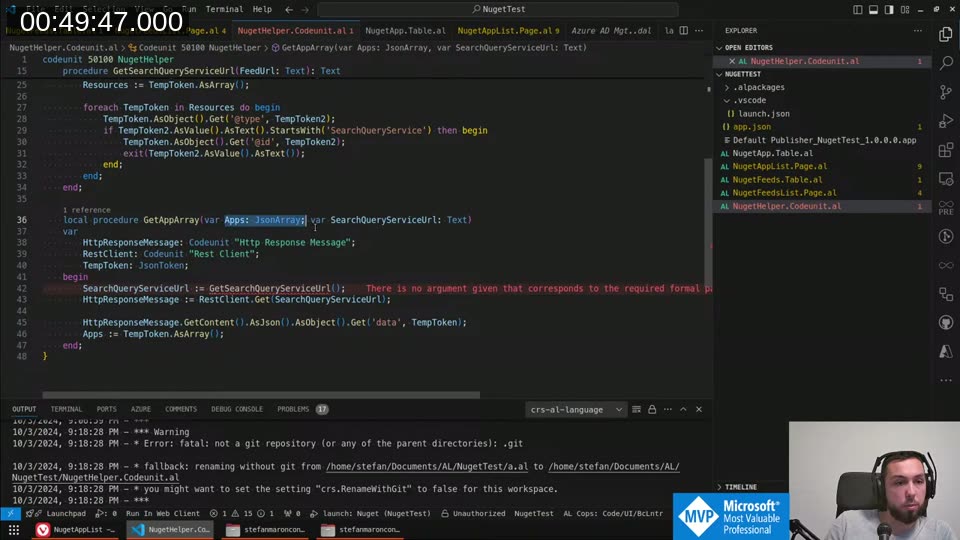
With this in place the search loop on the page calls NugetHelper.GetAppArray(...), passes the result into Load(...), and the list refreshes. The result against the AppSource feed and against api.nuget.org both worked straight away.
Getting the Package Content URL
The search results don’t include a download link directly — that lives in the registration entry. The path is:
- From the feed index, find the
RegistrationsBaseUrlentry (same pattern asSearchQueryService) - Fetch
{RegistrationsBaseUrl}/{packageId.toLower()}/index.json - From that JSON, use the JSONPath
$.items[0].items[0].packageContentto get the download URL
I used the JSONPath Online Evaluator to work out the path while building this — that tool is genuinely useful for navigating nested JSON structures.
HttpResponseMessage := RestClient.Get(NugetHelper.GetRegistrationsBaseUrl(FeedUrl) + Rec.Id.ToLower() + '/index.json');
HttpResponseMessage.GetContent().AsJson().SelectToken('$.items[0].items[0].packageContent', TempToken);
DownloadUrl := TempToken.AsValue().AsText();
SelectToken with a JSONPath expression is one of the nicest things in the AL JSON API — no manual iteration needed.
Downloading and Installing
Once I had the download URL, the approach was:
- Fetch the URL with
RestClient.Get()and get the response as anInStream - Use the
Data Compressioncodeunit to open it as a ZIP archive (NuGet packages are ZIPs) - Extract the second entry from the ZIP — that’s the
.appfile - Pipe it through a
Temp Blobto get a cleanInStream - Call
ExtensionManagement.UploadExtension(InStr, 1033)
HttpResponseMessage := RestClient.Get(DownloadUrl);
InStr := HttpResponseMessage.GetContent().AsInStream();

DataCompression.OpenZipArchive(InStr, false);
DataCompression.GetEntryList(EntryList);

TempBlob.CreateOutStream(OutStr);
DataCompression.ExtractEntry(EntryList.Get(2), OutStr);
TempBlob.CreateInStream(InStr);

ExtensionManagement.UploadExtension(InStr, 1033);
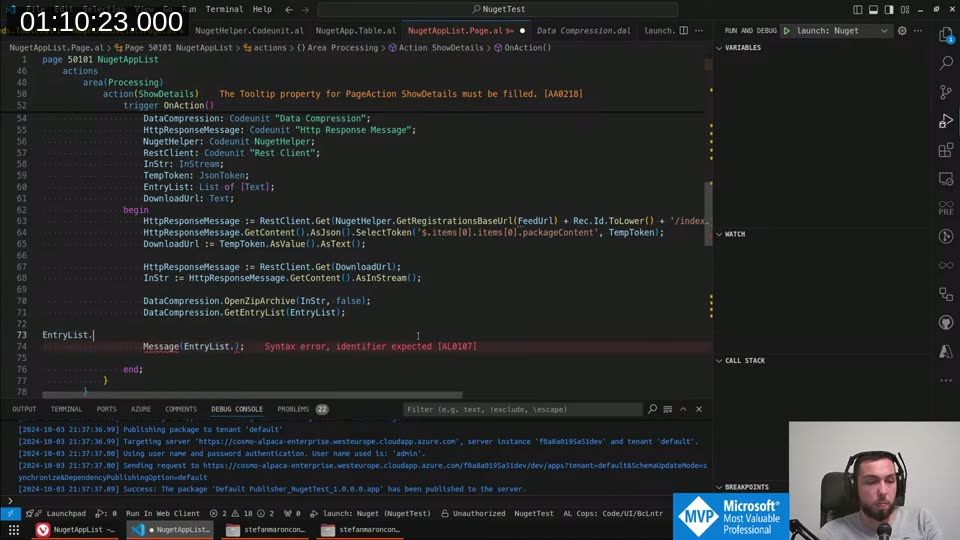
The index EntryList.Get(2) is hardcoded here — in a proper implementation you’d scan the entry list for a filename ending in .app. But for the proof of concept it was fine.
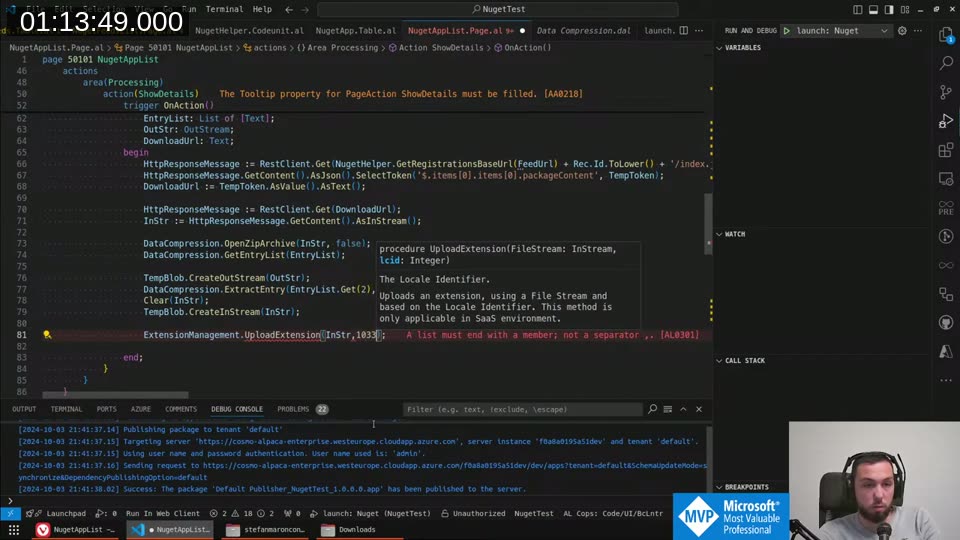
The container I was coding against runs as a service, not a sandbox — and UploadExtension requires a SaaS environment. So I switched to a sandbox tenant, pointed the extension at it, and tried again.
It Works
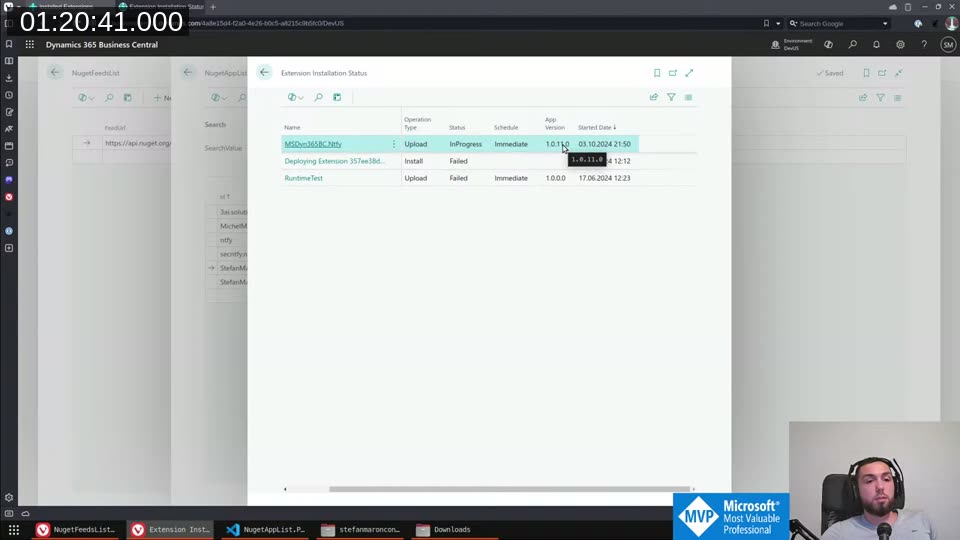
The Extension Installation Status page showed the app moving to InProgress and then completing. The app that landed was an older version — because the package I installed was published from AL-Go preview, which uses pre-release versioning — but the installation itself worked. The upload failed with an ID range conflict on the first attempt (the app ID falls in the F-range, which is reserved), but that’s an app-level thing, not a problem with the approach.
What This Could Be Used For
This was a proof of concept, but the potential is real. A few things that came to mind during the stream:
Open-source app distribution. Apps that don’t belong on AppSource — too niche, free to use, or just not worth the certification overhead — could be published to a public NuGet feed and installed directly by customers without needing a deployment pipeline or a service principal.
Private customer feeds. Instead of deploying via service authentication from AL-Go, you could maintain a private Azure Artifacts feed per customer. They configure the feed URL and token in BC, and from that point they can pull and install updates themselves. No deployment pipeline involvement on the customer side.
On-the-fly ID range renumbering. This one is more speculative — if an installed app conflicts with an existing ID range, could you renumber the incoming package before installation? Technically possible, definitely fragile. I’m not sure it’s a good idea, but I had the thought.
The hard part now is shaping this into something actually usable: proper dependency resolution, version management, error handling, and moving the token to isolated storage. But the core question — can we install BC apps from a NuGet feed using native BC code — is answered.
💡 Added context: AL-Go for GitHub can automatically deliver apps to a NuGet feed after every successful build. If you create a secret called
GitHubPackagesContextwith a token and server URL, AL-Go will push every app as a NuGet package to your GitHub Packages registry — named<publisher>.<name>.<appid>— and also use it for dependency resolution across your repositories. That’s the feed side of this whole approach. See the AL-Go Continuous Delivery workshop for setup details.
📖 Docs: The
ExtensionManagementcodeunit exposesUploadExtension(FileStream: InStream, lcid: Integer)andUploadExtensionToVersion(...)for targeting the next minor or major update slot. Both are SaaS-only — they won’t work against a Docker container running as a service instance, which is why switching to the sandbox tenant was required.
This post was drafted by Claude Code from the stream transcript and video frames. The full stream is on YouTube if you want the unfiltered version. (I did read and check the output before posting, obviously 😄)