Optimizing BC Code History Downloads with HTTP Range Requests
The MSDyn365BC.Sandbox.Code.History repository automatically tracks every version of the Microsoft Business Central application source code across roughly 50 countries. Two GitHub Actions workflows run daily, picking up new BC sandbox artifacts and committing the AL source to version-controlled branches.
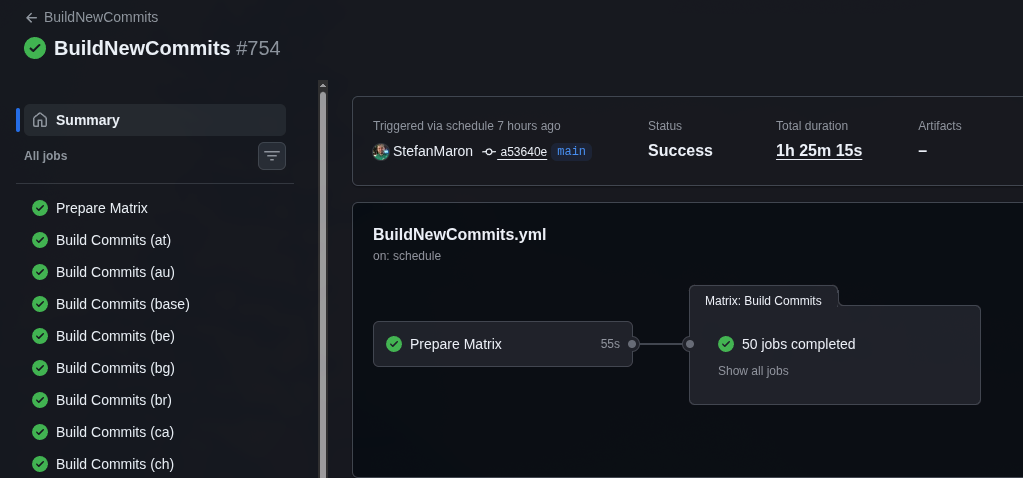
It works well — but builds had started failing silently, and once I started digging in, things unraveled fast.
Fixing what was broken first
The original trigger was rebase failures. When late hotfix versions created merge conflicts during git pull --rebase, the scripts relied on fragile output string matching to detect and resolve them. That broke regularly. The real fix was switching to --ours for conflict resolution on all files, not just metadata. This is safe because every commit in this repo is a complete artifact snapshot — there’s no incremental history to preserve, so “ours” (the current branch state) is always correct.
While investigating that, I noticed the scripts had $ErrorActionPreference = "SilentlyContinue" set globally. Removing it exposed a cascade of hidden bugs that had been silently failing for months:
- Expression parsing bug:
Write-Host ($country-$version)was interpreted as arithmetic subtraction, not string concatenation. Previously masked by error suppression. - Null array indexing:
Get-ChildItemreturns null when noApplications.XXfolder exists for a given country. Without the null check, the script crashed — silently. - Missing Applications folders: Some insider artifacts for smaller countries don’t contain source code at all. The scripts assumed every country had one. Fixed by creating marker commits with just
version.txtto prevent re-processing the same version every daily run. - vNext commit message mismatch: The grep pattern searched for
{country}-{version}-vNextbut actual commits used{country}-{version}without the suffix. Every version was re-processed on every run since the grep never matched, creating duplicates.
Each fix revealed the next issue. The error suppression had been papering over null references, parsing bugs, missing folder handling, and incorrect commit patterns — all at once. Once the pipeline was actually stable, I started looking at whether the download step could be improved. It was taking 4 to 5 hours per run, mostly spent downloading and extracting files it didn’t need.
The download problem
Each BC sandbox artifact is an 800MB to 2GB+ ZIP file. For the w1 (worldwide) artifact, the pipeline downloads the platform package — which includes ServiceTier, WebClient, database backups, and everything else — just to get the Applications/ folder inside. That folder contains roughly 100–120MB of source ZIPs. The rest is dead weight.
The old pipeline used Download-Artifacts from the BcContainerHelper PowerShell module, which downloads the entire ZIP and then extracts everything using PowerShell’s Expand-Archive. If you’ve ever used Expand-Archive on a large file, you know it’s painfully slow. Multiply that by ~50 countries running daily and you get the 4–5 hour runtime.
The discovery
Azure Blob Storage — where BC artifacts are hosted — supports HTTP Range requests (Accept-Ranges: bytes). That by itself isn’t remarkable. What makes it useful is how ZIP files work internally.
A ZIP file stores a central directory at the very end of the file. This directory indexes every entry in the archive — file name, byte offset, compressed size. Which means you can:
- Download just the last 64KB to read the central directory
- Parse it to find exactly where the
Applications.{COUNTRY}/entries live - Download only that byte range
- Extract the needed files from the partial download
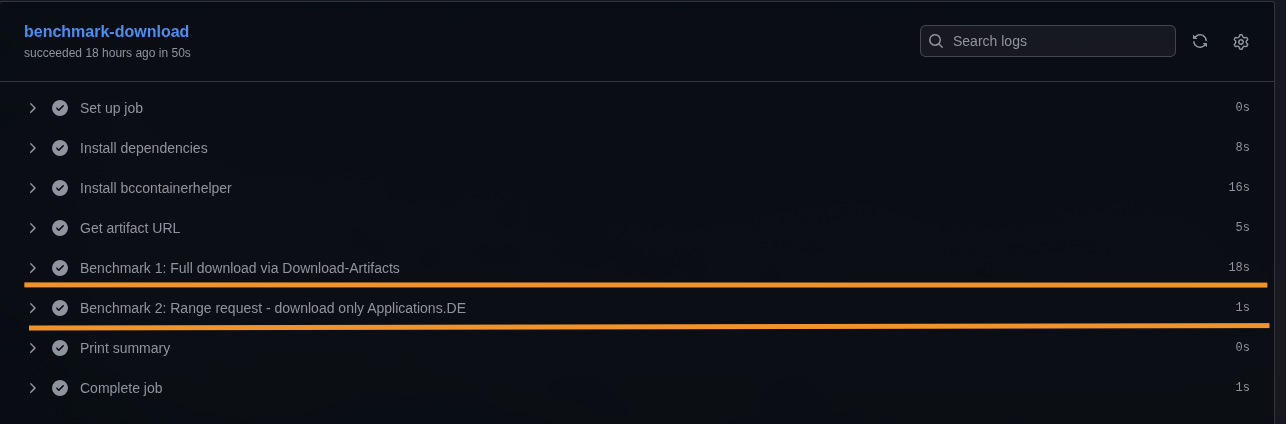
I wrote a quick benchmark workflow to confirm the approach. For a German artifact: 18 seconds for the full download via Download-Artifacts vs 1 second for the range request. ~119MB transferred instead of ~1GB. That’s an 88% bandwidth reduction per country.
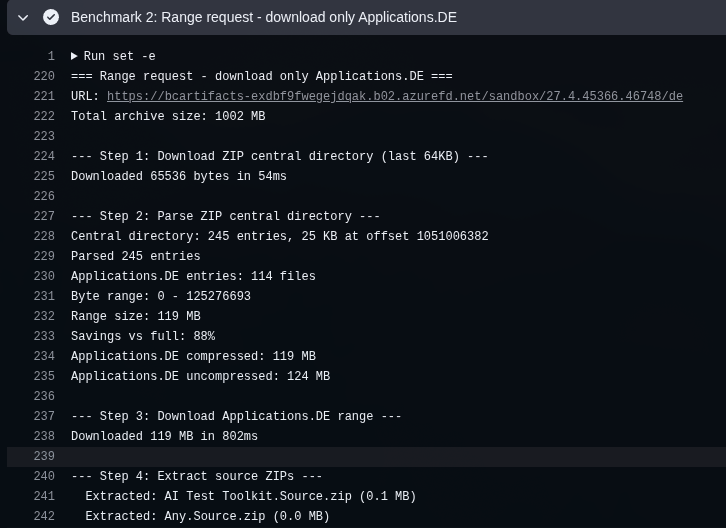
The detailed log from the range request shows the individual steps — downloading the 64KB central directory, parsing 245 entries, identifying 114 files matching Applications.DE, and downloading just the 119MB range in 802ms:
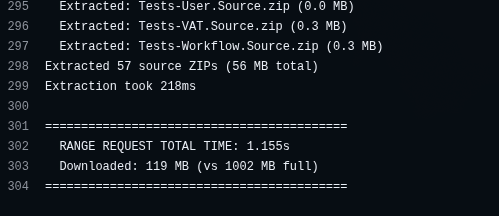
57 source ZIPs extracted, total time 1.155 seconds — 119MB downloaded instead of the full 1002MB archive:
Implementation
Three components make this work.
The Python script
download_range_helper.py (~170 lines, stdlib only) handles the binary ZIP parsing and selective extraction. The flow:
- Download the last 64KB via
curl -rto read the ZIP End of Central Directory Record (EOCD) - Parse the EOCD signature (
PK\x05\x06), find the central directory offset and entry count - If the central directory doesn’t fit in the 64KB tail, download it separately
- Parse all central directory entries (
PK\x01\x02signatures), filter by the target folder prefix - Download the contiguous byte range containing the matching entries
- For each entry: read the local file header, handle stored (method 0) or deflated (method 8) compression via Python’s
zlib - Extract
.zipand.appfiles to the output directory
The decompression in step 6 happens entirely in memory — zlib.decompress() takes the compressed bytes and returns the decompressed content, which then gets written directly to the output file. There’s no intermediate extraction to disk like Expand-Archive does. That’s probably a significant part of why this is so much faster: download into memory, decompress in memory, write the final file. No temp files, no disk I/O for the archive itself.
There’s also a safety check: if the byte range exceeds 50% of the total archive size, the script exits with failure. At that point you’re not saving enough to justify the complexity, and the fallback kicks in.
# Safety check — if we'd download more than half the archive,
# just fall back to the full download
if (max_offset - min_offset) > total_size * 0.5:
    print("Range exceeds 50% of archive, falling back")
    sys.exit(1)
The script uses tempfile.mkdtemp() for temporary files to avoid collisions when multiple countries process in parallel via GitHub Actions matrix.
The PowerShell wrapper
Download-ApplicationsRange.ps1 (~50 lines) handles the HTTP plumbing:
- Sends a HEAD request to verify
Accept-Ranges: bytesand getContent-Length - Creates a temp output directory
- Calls
python3 download_range_helper.py - Post-check: verifies the output directory actually contains
.zipfiles - Returns the path on success,
$nullon any failure
The entire range download stack is deliberately minimal: Python 3 with only standard library modules (struct, zlib, subprocess, tempfile), PowerShell 7 for orchestration, and curl for the HTTP requests. No additional dependencies to install on the GitHub Actions runner.
The modified workflows
The main change to Auto_load_versions.ps1 and Auto_load_versions_vNext.ps1 is straightforward: try the range download first, fall back to the full download if it fails. For w1, the script constructs the platform URL by replacing the last path segment (/w1 → /platform) and targets the Applications/ prefix. For other countries, it uses the artifact URL directly and targets Applications.{COUNTRY}/.
The debugging was the hard part
The implementation itself was quick. Getting it to work reliably inside the pipeline took longer.
Script not found after branch switch. The range download scripts only exist on main. After git switch to a country branch — like de-26 — the files are gone. The fix: move the range download call before the branch switch.
Script not found on the second loop iteration. The workflow processes multiple versions in a loop. After version 1 switches to the country branch, it stays there for version 2. The scripts are still missing. Fix: copy the scripts to /tmp/range-scripts/ at startup so they survive branch switches across all iterations.
git pull --rebase fails on new branches. After cleaning up obsolete vNext branches, the vNext pipeline recreated them — but git pull --rebase origin {branch} failed because the remote branch didn’t exist yet. Fixed with a git ls-remote --heads check before pulling.
Some countries have no Applications folder. Countries like ee (Estonia) simply don’t have an Applications.EE/ folder in their artifact. The range download correctly identifies zero matching entries and falls back. The full download also finds nothing and creates a marker commit. This was already expected behavior — the new code just needed to handle it gracefully.
Fallback design
Every failure mode falls through to the existing full download path. The range approach is purely an optimization — if it doesn’t work, the pipeline behaves exactly as before.
| Failure | Behavior |
|---|---|
| CDN doesn’t support Range | HEAD check fails → $null |
| EOCD signature not found | Python exits 1 → $null |
| No matching folder entries | Python exits 1 → $null |
| Range > 50% of total size | Python exits 1 → $null |
| curl / network error | Python exits 1 → $null |
| 0 ZIPs extracted | Post-check fails → $null |
| python3 not available | Script errors → $null |
This was intentional. The worst case of the range approach failing is that the pipeline runs at the same speed it always did.
Other optimizations
Two additional changes helped significantly.
Targeted git fetch. The repository has 500+ branches (one per country-major combination). The old pipeline ran git fetch --all, fetching every branch on every run. Replaced with targeted fetches of only the 2–3 branches actually needed per iteration — main, the target branch, and the previous major’s branch. This alone saved several minutes per job.
Remote branch existence check for vNext. Added a git ls-remote --heads check before git pull --rebase on vNext branches. When a branch is newly created with no remote counterpart yet, the pull fails. Now it skips the pull and just pushes.
Branch cleanup
While working on this, I also cleaned up 196 obsolete vNext branches (majors 24–27) where regular release branches already existed. These had been superseded by GA releases. The automation recreates them automatically when new insider builds arrive, so nothing is lost. Kept 98 active vNext branches (majors 28–29) where no regular release exists yet.
Results
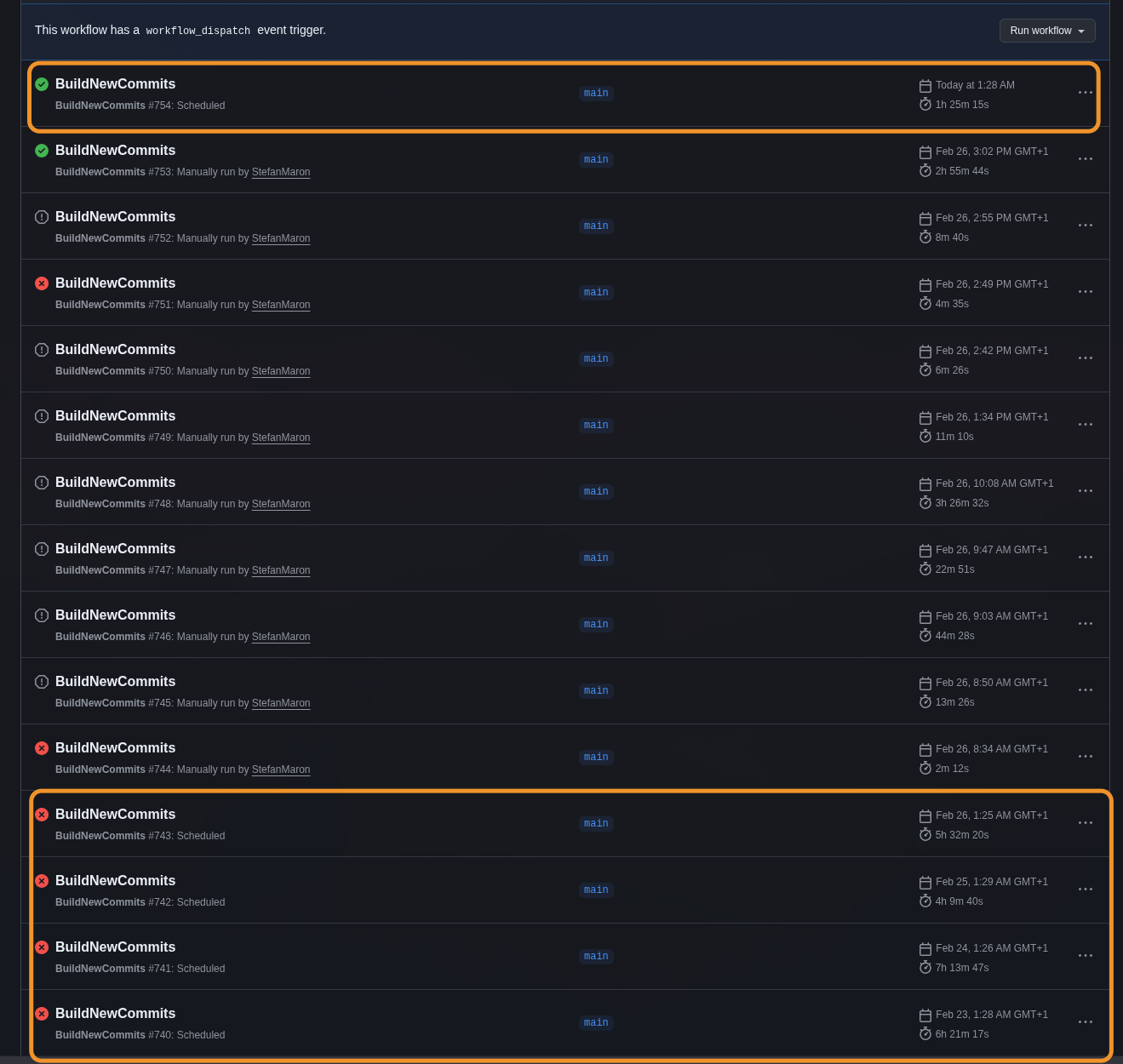
- BuildNewCommits (regular releases): ~1.5 hours, down from 4–5 hours
- BuildNewCommitsvNext (insider builds): ~1 hour, down from 4–5 hours
- Bandwidth per country: ~120MB instead of 800MB–2GB+
- Zero failures in both scheduled runs after the fixes
- Identical output verified: same AL source files, same commit structure, correct
version.txt
The wall-clock time only tells half the story though. Since all ~50 countries run in parallel via GitHub Actions matrix, the cumulative usage is a better measure of actual compute saved. The last scheduled run before the optimization (Feb 26, the 5h 32m run) had a total usage of 5 days, 17 hours, 35 minutes across all jobs. The first clean run after: 19 hours, 15 minutes.
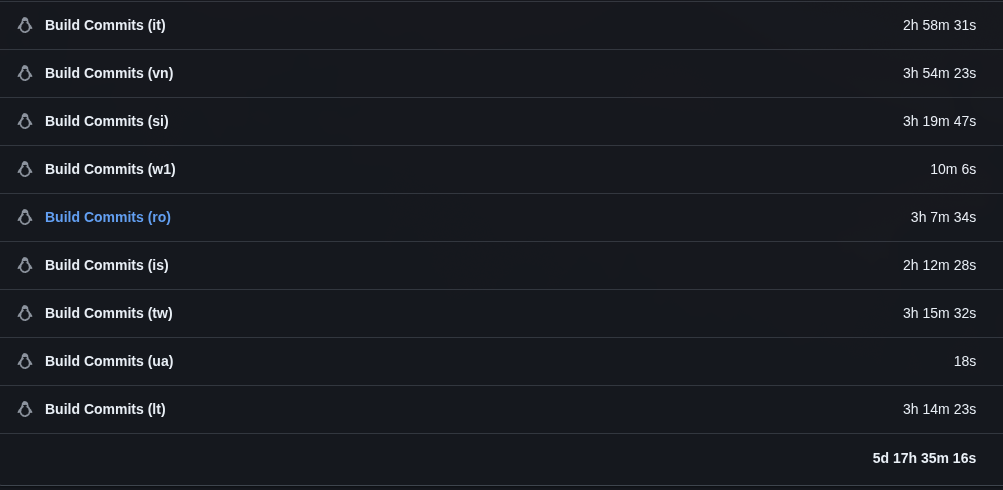
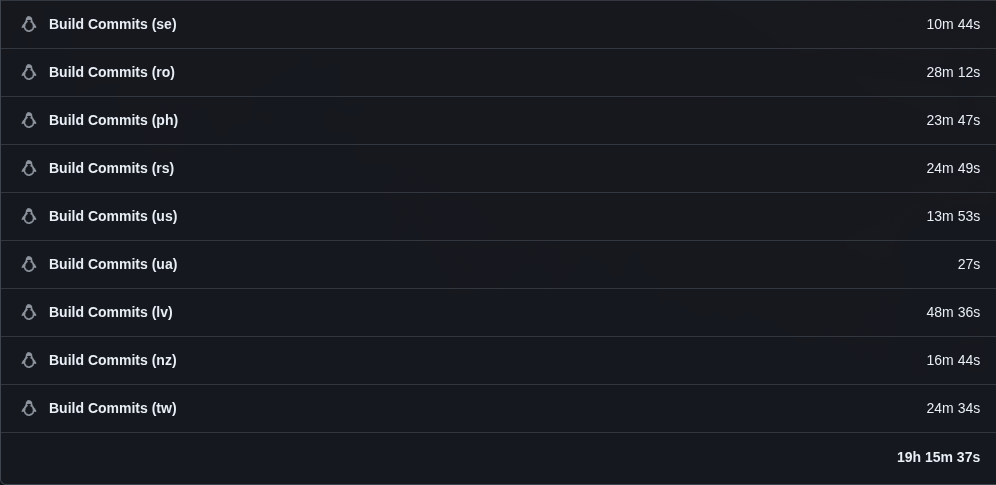
That’s a ~86% reduction in compute time for a single workflow run — from nearly 6 days of cumulative runner minutes down to under 20 hours. With both the GA and vNext workflows running daily, the combined savings go from nearly 12 days to about 38 hours.
Why this matters
The Sandbox Code History repository wasn’t the first one. I originally started with MSDyn365BC.Code.History , which tracks on-premises artifacts. On-prem only gets one update per month — new majors or cumulative updates — so the volume is manageable. The same scripts power both repositories.
Sandbox artifacts are a different story. Hotfixes land constantly, which means daily processing across ~50 countries. When I first considered adding sandbox tracking, the math didn’t work: a single sequential run took over 5 days of compute time. Daily updates on something that takes 5 days to process is obviously impossible.
What made it viable was discovering that GitHub Actions gives you free parallel runners on public repositories. Running all countries as a matrix strategy brought the wall-clock time down to 4–5 hours — tight for a daily schedule, but workable. With the same pipeline also running for vNext insider builds, the total was nearly 12 days of cumulative compute every day, split across two workflow runs.
After the range request optimization, that dropped to about 19 hours of cumulative compute per run — roughly 38 hours total across both, under 90 minutes of wall-clock time each. A single run could now theoretically process sequentially within a day, but both together still need the parallel approach. Either way, the GitHub Actions matrix setup is already there and working, and 90 minutes per run is a comfortable margin for a daily schedule.