Planning Table Indexes for the Best Performance
At BC TechDays 2025 in Antwerp, Alexander Drogin and I presented a 90-minute session on table indexes in Business Central — every type, when to use them, and the traps that cost you deadlocks. You can watch the full recording on YouTube if you want to follow along.
This post is the written version of that talk. Alexander writes extensively about this topic on his blog, and I’ll link to his posts throughout — they go much deeper on the individual topics than we could in the slides.
The trade-off you can’t avoid
The pitch for indexes is simple: faster reads. An index seek uses the B-tree structure to jump directly to the data you need, as opposed to a scan which reads the entire table. The performance difference is logarithmic vs linear — the bigger the table, the more it matters.
But every index you add slows down writes. Insert, update, delete — all of them have to maintain every index on the table. In one benchmark we ran, inserting 500,000 rows into a table with no indexes took around 20 seconds. With 10 indexes on the same table, that jumped to over 50 seconds.
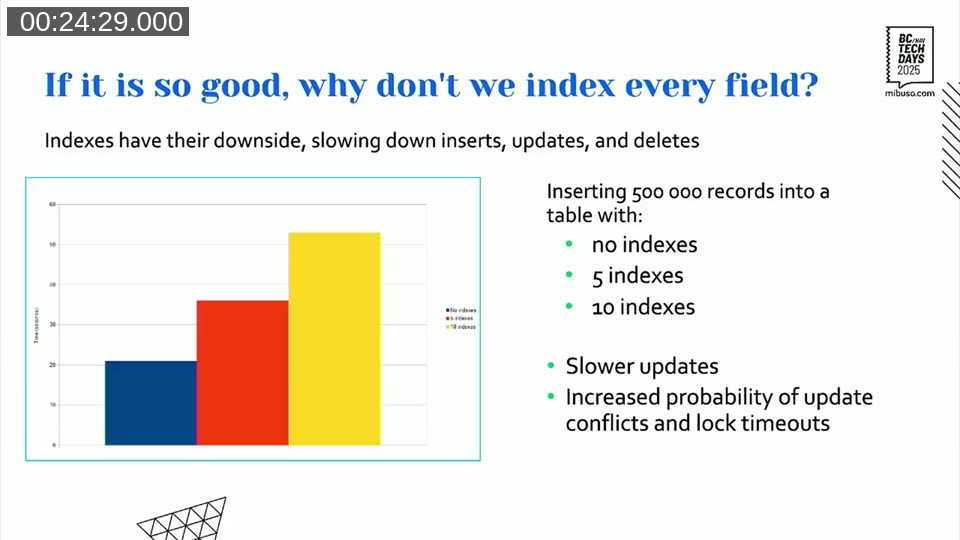
Slower writes also mean longer lock hold times, which means higher probability of lock timeouts and deadlocks in multi-user environments. The rule of thumb: every added index can increase insert or update time by 10–20%. Treat that as a cost you need to justify.
Keys vs. indexes in BC — the terminology trap
Before going further it helps to be clear on terms, because Business Central and SQL Server use the same words differently.
In SQL Server, a key is a constraint (like a uniqueness enforcement) and an index is the B-tree structure that speeds up reads. In Business Central, a key(...) definition in AL is an index definition — unless you mark it Unique, in which case it becomes both.
The primary key in BC is always both: a clustered index and a primary key constraint. And every BC table automatically gets a non-clustered unique index on $systemId on top of that. So before you define a single key yourself, you already have two indexes on every table.
Clustered index — it is the table
The clustered index is special because its leaf nodes contain the actual table data. There is exactly one per table, it defines the physical ordering of rows on disk, and in BC it always corresponds to the primary key by default.
You can move the clustered index to a different key by setting Clustered = true on it — but this does not change the primary key. The first key in the list is always the primary key regardless of which key is clustered.
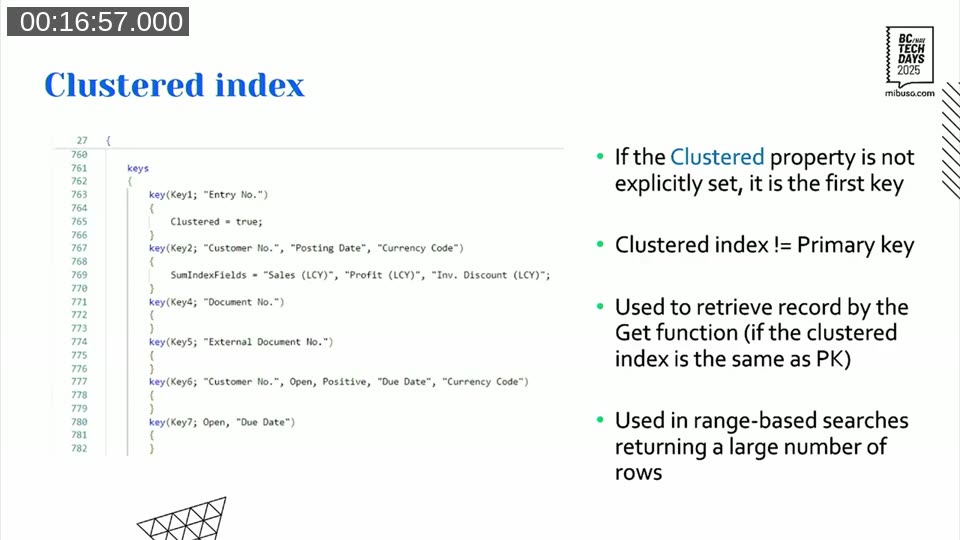
The clustered index is used by Get() and by range-based queries that return a large proportion of the table. For everything else — filtering on non-primary-key fields — you need non-clustered indexes.
Non-clustered indexes and how fast they actually are
Every index that is not the clustered one is a non-clustered index. SQL Server supports up to 999 per table; Business Central limits you to 40. Even 40 is a lot. The 10% rule from Michael J. Swart applies here: if you’re using more than 10% of what SQL Server allows, you’re probably doing it wrong.
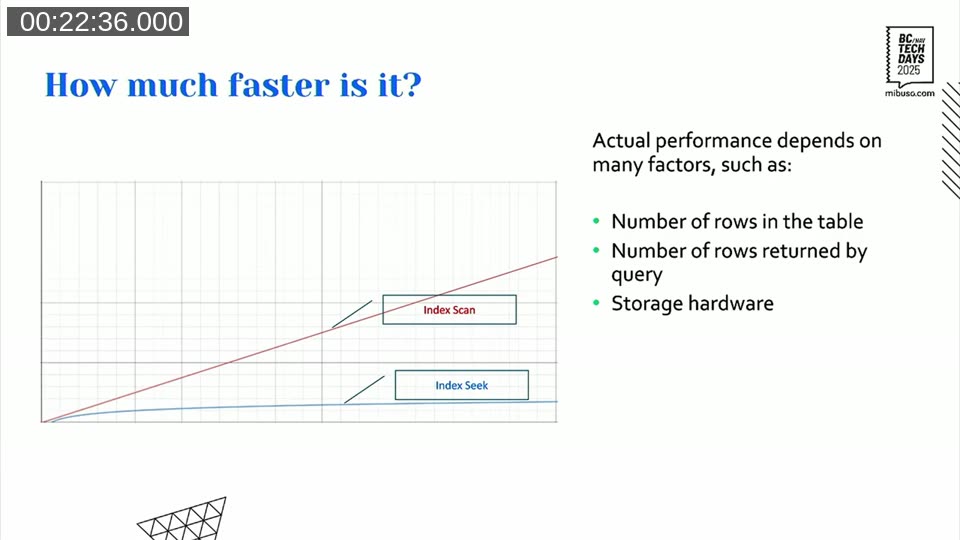
A non-clustered index seek is fast because it uses the B-tree to descend directly to the value — logarithmic growth as data grows. A scan reads everything. The difference becomes significant quickly.
There’s one counterintuitive case worth calling out: sometimes adding an index makes a query slower. Business Central adds a FAST 50 hint to every query it sends to SQL Server, which tells the optimizer to prioritize returning the first 50 rows as fast as possible — even if that means the complete result takes longer overall.
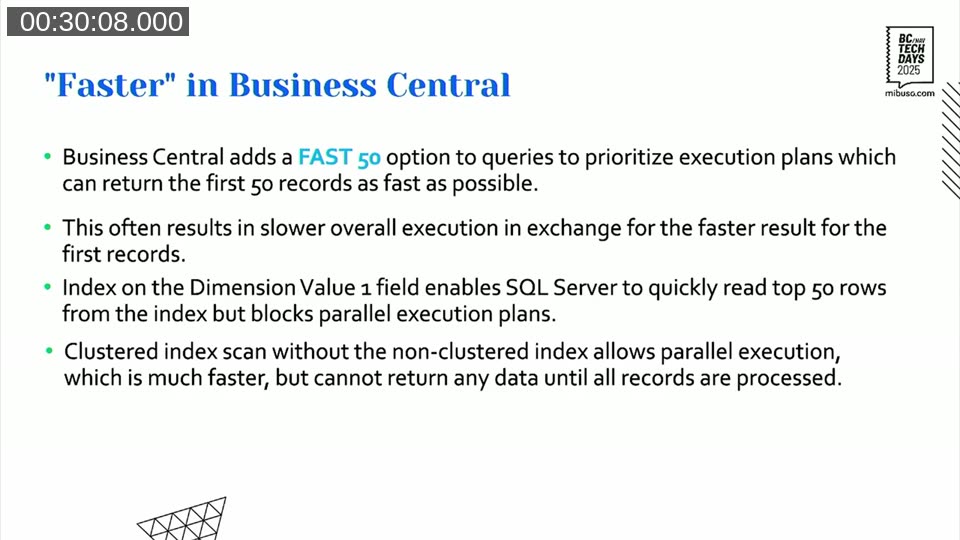
In one example from Alexander, adding a non-clustered index on a Dimension Value field caused total query execution time to jump from ~260ms to nearly 2 seconds. The index allowed SQL Server to return the first 50 rows quickly by reading from the non-clustered index — but that blocked parallel execution. Without the index, SQL Server fell back to a clustered index scan which ran in parallel threads and completed the full result set faster. It depends on what “faster” means for your query.
📖 Docs: Alexander has written about this FAST 50 behavior and the general topic of index selectivity in his post On the efficiency of indexes on a skewed dataset on keytogoodcode.com.
Covering indexes and included fields
A covering index is one that contains all the fields a query needs — so SQL Server never has to do a key lookup back into the clustered index. Key lookup operations are expensive and show up prominently in execution plans.
The IncludedFields property lets you attach additional fields to the leaf nodes of a non-clustered index without adding them to the B-tree structure. Fields in the WHERE clause go in the index definition; fields in the SELECT clause go in IncludedFields.
📖 Docs:
IncludedFieldsproperty reference on learn.microsoft.com.
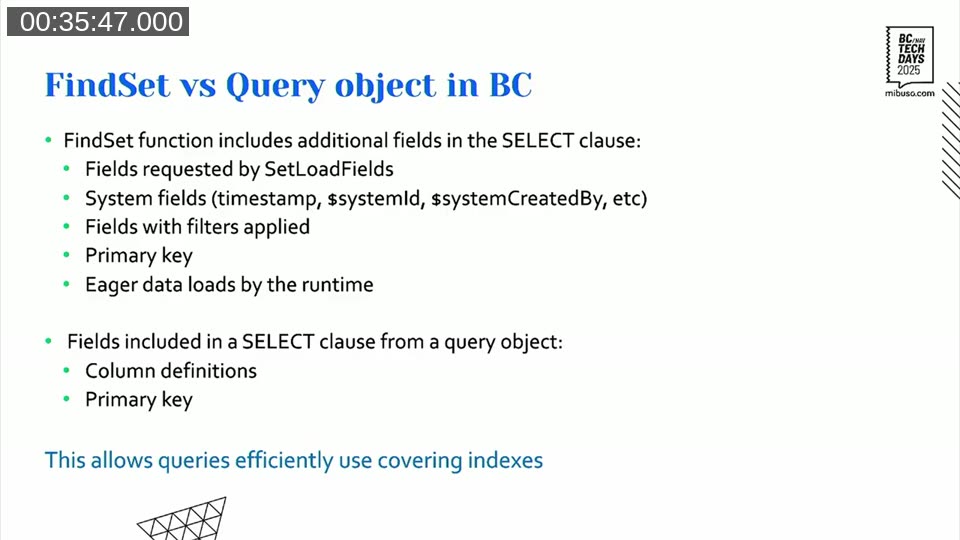
The critical point here: covering indexes work much better with Query objects than with FindSet. A FindSet call adds a non-trivial number of extra fields to the SELECT clause — system fields, timestamp, filter fields, sometimes fields added by event subscribers at runtime. You can never fully predict what it will select. A Query object selects only what you define in columns, plus the primary key. That makes it practical to build a genuinely covering index for a Query.
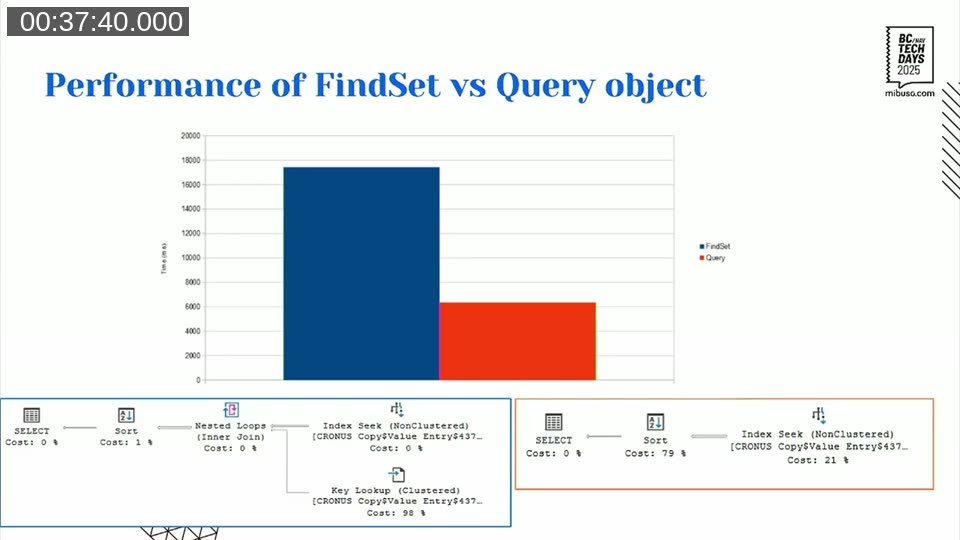
In Alexander’s benchmark, replacing FindSet with a Query object on the same covering index cut execution time from ~17 seconds to ~6 seconds. Eliminating the key lookup makes that difference.
One thing to watch: covering indexes with many included fields consume significant storage. In a test on a 2.5M row table (2.77 GB of data), adding 5 decimal fields to 3 indexes grew the total database size by 21% — from 3.19 GB to 3.85 GB. Each individual index roughly tripled in size (from ~140–150 MB to ~340–400 MB each).
Storage is not cheap in SaaS BC. Covering indexes are powerful, but they have a cost.
📖 Docs: Alexander has two posts that go deeper here:
- Covering indexes as an alternative to SIFT — the full breakdown
- Select with partially matching index: can we make it faster? — what happens when no single index covers all the data you need
SIFT — blazing fast reads, dangerous writes
SIFT (SumIndexFields) is not technically an index — it’s an indexed view in SQL Server. Think of it as a pre-calculated aggregate table that SQL Server maintains automatically. Every time a row is inserted, updated, or deleted from the base table, SQL Server updates all associated SIFT views. When you call CalcFields or CalcSums, BC redirects the query to the SIFT view automatically.
For reads, this is unbeatable. In benchmarks, SIFT outperforms even covering indexes by roughly 2× for aggregation queries. The aggregation work is done at write time, so reads just return pre-computed values.
The problem is writes — specifically, deadlocks.
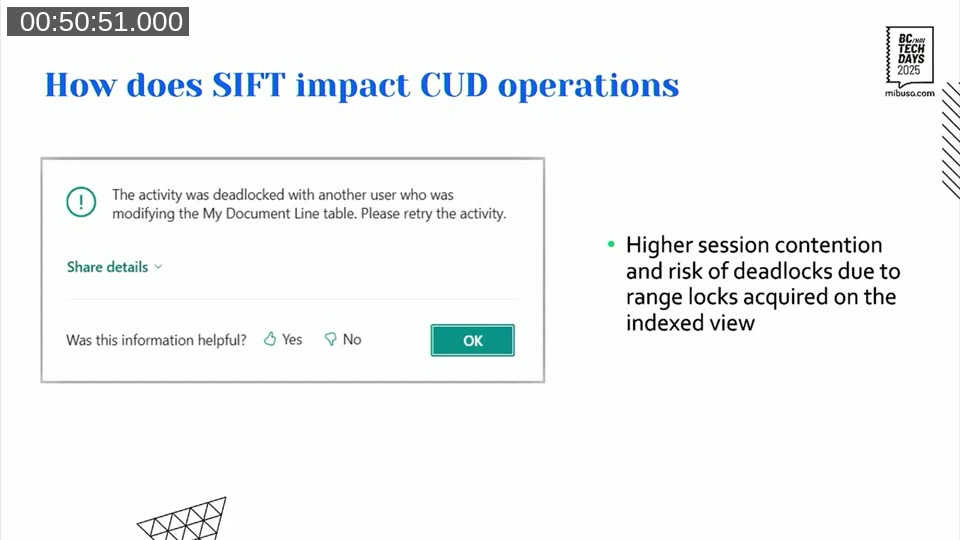
When SQL Server updates a SIFT view, it acquires range locks — not the more granular row locks you get with regular index updates. In multi-user environments with concurrent inserts, those range locks collide. Alexander had a real customer case that illustrates this exactly:
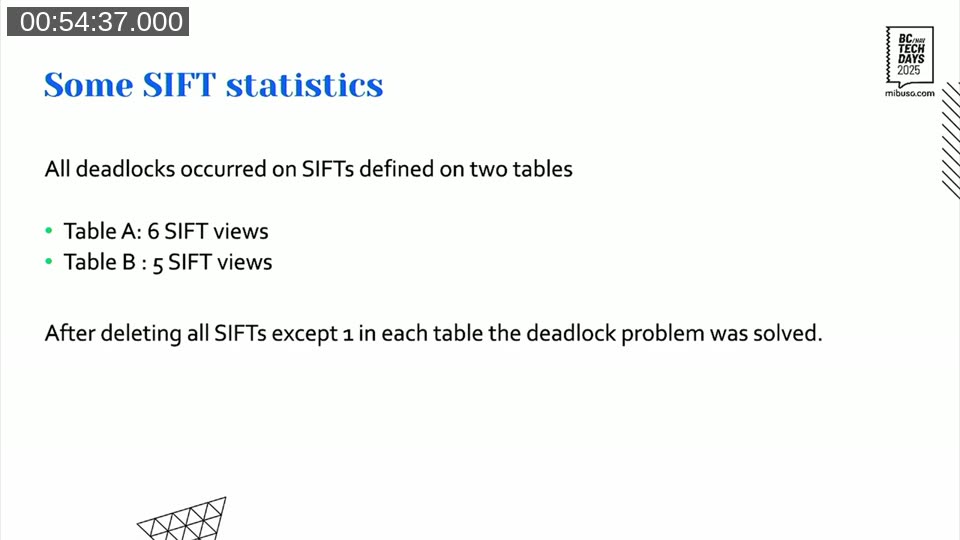
190 concurrent sessions, 16,000 transactions per day posted in short spikes — hundreds of deadlocks per burst. All deadlocks were on two tables that had 6 and 5 SIFT views respectively. Reducing each to 1 SIFT view resolved the problem completely.
The rule of thumb Alexander uses: 1–2 SIFT views on a write-heavy table is probably okay. More than 2, stop and think hard about whether you need them. If a table sees heavy concurrent writes, even a single SIFT might cause problems depending on data distribution.
📖 Docs: Alexander has written extensively about this on keytogoodcode.com:
- SIFT — the fundamentals
- The dark side of SumIndexFields. Concurrency. — the deadlock mechanics in detail
- Buffered inserts and deadlocks — another angle on SIFT-driven deadlocks under concurrent load
- Filtering on FlowFields — how SIFT views interact with FlowField-based filters
- Table indexes and inserts — benchmarks for write impact
Columnstore indexes (NCCI) — the SIFT successor?
The Microsoft documentation describes the Non-Clustered Columnstore Index (NCCI) as the intended successor to SIFT. The reality is more nuanced.
A columnstore index is fundamentally different from a row-store index. It stores data column by column, with each column split into compressed segments of up to 1,048,576 rows. There is no B-tree — no seek operations. Every access is a segment scan.
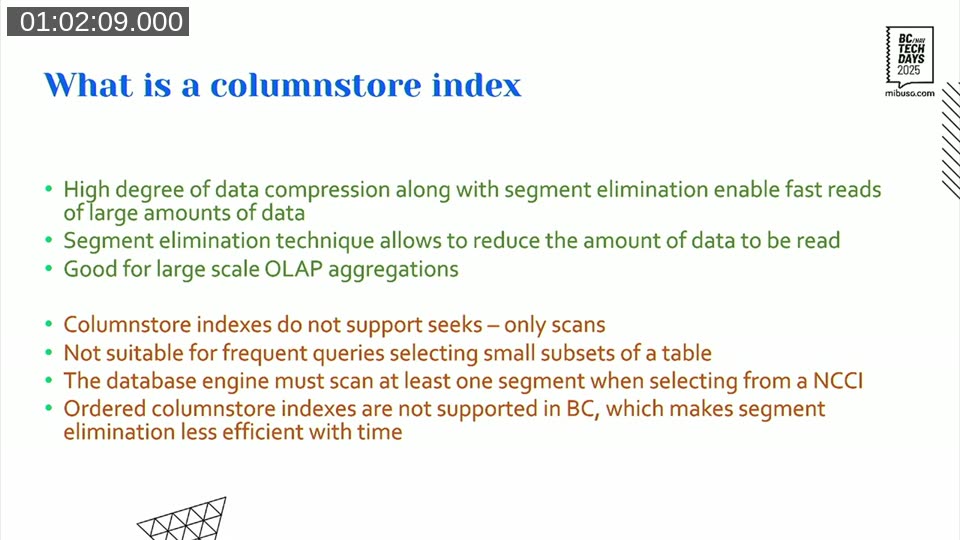
The strengths: high compression ratio, and a technique called segment elimination where SQL Server skips entire million-row segments that can’t contain matching values. For large OLAP-style aggregations across millions of rows this can be very fast. The write overhead is also much smaller than SIFT — around 7–8% per field added, versus SIFT’s explosive growth.
The limitations are real though. Columnstore indexes don’t support seeks, so they’re useless for FindFirst / FindSet lookups on specific records. And critically, ordered columnstore indexes are not supported in BC (SQL Server added this in v2022+). Without ordering, segment elimination becomes less effective over time as new data gets distributed across all existing segments. The advantage degrades as the table grows and data gets spread out.
The sweet spot for NCCI: a large table (millions of rows), a heavy GROUP BY query that runs infrequently and returns data in a single pass, using a Query object. For CalcSums in a loop — don’t even look in this direction.
📖 Docs: Another alternative to SIFT: Columnstore indexes — Alexander’s deep dive on the topic.
Verifying that your index is actually used
The best way to check what SQL Server is actually doing with your query: use the AL debugger. Step over the statement you’re interested in, then look at “Last SQL statements” in the debugger. You’ll get the raw SQL with @0, @1 placeholders for parameters — substitute your actual values, paste into SQL Server Management Studio or Azure Data Studio, and enable “Include Actual Execution Plan”. That execution plan shows you exactly which index was used, whether there’s a key lookup, whether a sort operation is happening.
BC’s own web client now exposes the SQL Server “missing index” suggestions as well — worth checking if you’re hunting for where to add indexes.
For production environments where you can’t run SQL Server Management Studio directly, Application Insights telemetry with event ID RT0085 shows long-running SQL queries (threshold: 750ms). That’s where performance problems surface first.
📖 Docs: Long-running SQL query telemetry (RT0085) and the Database Missing Indexes page in the BC web client (available from v26.0 / 2025 release wave 1).
General considerations
A few things that apply regardless of which index type you choose:
More indexes is almost always worse for write-heavy tables. Create an index only after you’ve confirmed it’s actually needed and it’s actually used.
Put the most selective field first in the key. A field with many distinct values (like posting date on a company with years of history) is more selective than one with few (like a boolean or a short enum). The more selective field at the front gives the optimizer a better starting point.
Don’t index low-cardinality fields. A boolean that’s 90% false adds almost nothing to seek selectivity but still pays the write cost.
Query objects over FindSet for covering indexes. If you care about covering index behavior, the predictable SELECT clause of a Query object makes it achievable. With FindSet it’s basically impossible to guarantee.
Decide based on actual access patterns. A table that gets batch-inserted all day but read only at month-end should be optimized for writes and accept slower reads. A lookup table that never changes can afford more indexes.
The session had a good quote from Michael J. Swart that I think sums it up: “If you’re using over 10% of what SQL Server restricts you to, you’re doing it wrong.” SQL Server allows 1,000 indexes per table. In BC you’re capped at 40. If you’re approaching 40, something has gone seriously wrong.
This post was drafted by Claude Code from the stream transcript and video frames. The full recording is on YouTube if you want the unfiltered version. (I did read and check the output before posting, obviously 😄)